apache plugin
| Plugin name | apache |
| Type | read |
| Callbacks | config, read |
| Status | supported |
| Since | 3.9 |
| Copyright | 2006–2008 Florian Forster, 2007 Florent Monbillard |
| License | GPLv2 |
| Configuration | collectd.conf(5) |
The Apache plugin queries the page generated by mod_status, the status module of the Apache web server, parses it and submits the number of bytes transfered, the number of requests received, and the number of processes in the various states of the scoreboard. The output of the status module of lighttpd is understood, too.
The plugin uses libcurl to connect to the web server, optionally using a configured username/password to authenticate. It tries to keep a keep-alive connection open to minimize the overhead of connecting to the server. It's also possible to query hosts over SSL.
Details of the configuration can be found in the collectd.conf(5) manual page.
Synopsis
Apache
collectd
 LoadPlugin "apache"
 <Plugin "apache">
    <Instance "apache80">
        <nowiki>URL "http://localhost/mod_status?auto"</nowiki>
        User "collectd"
        Password "hoh2Coo6"
    </Instance>
    <Instance "lighttpd8080">
        <nowiki>URL "http://localhost:8080/mod_status?auto"</nowiki>
    </Instance>
 </Plugin>
NB: The "apache" plugin requires that you specify a URL which produces a "Machine Readable Status File" ( [//httpd.apache.org/docs/2.2/mod/mod_status.html#machinereadable httpd.apache.org/docs/2.2/mod/mod_status.html#machinereadable] ). Failing to append '?auto' to the end of the URL will result in the status page being returned with a MIME type of 'text/html' rather than 'text/plain', which is incompatible with the plugin.
Example graphs
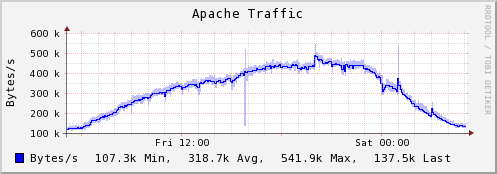
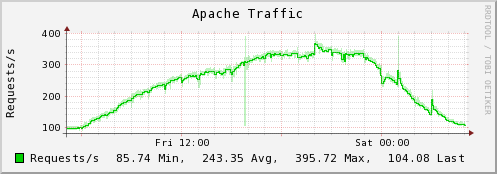
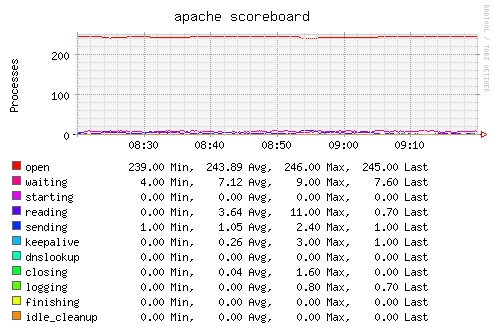
See also
Dependencies
Configuration
Configuration options · from collectd.conf(5)
See this section in the full configuration reference
To configure the apache-plugin you first need to configure the Apache webserver correctly. The Apache-plugin mod_status needs to be loaded and working and the ExtendedStatus directive needs to be enabled. You can use the following snipped to base your Apache config upon:
ExtendedStatus on
<IfModule mod_status.c>
  <Location /mod_status>
    SetHandler server-status
  </Location>
</IfModule>
Since its mod_status module is very similar to Apache's, lighttpd is also supported. It introduces a new field, called BusyServers, to count the number of currently connected clients. This field is also supported.
The configuration of the Apache plugin consists of one or more <InstanceE<nbsp/>> blocks. Each block requires one string argument as the instance name. For example:
<Plugin "apache">
  <Instance "www1">
    URL "http://www1.example.com/mod_status?auto"
  </Instance>
  <Instance "www2">
    URL "http://www2.example.com/mod_status?auto"
  </Instance>
</Plugin>
The instance name will be used as the plugin instance. To emulate the old (versionE<nbsp>4) behavior, you can use an empty string (""). In order for the plugin to work correctly, each instance name must be unique. This is not enforced by the plugin and it is your responsibility to ensure it.
The following options are accepted within each Instance block:
- URL http://host/mod_status?auto
- Sets the URL of the
mod_statusoutput. This needs to be the output generated byExtendedStatus onand it needs to be the machine readable output generated by appending the?autoargument. This option is mandatory. - User Username
- Optional user name needed for authentication.
- Password Password
- Optional password needed for authentication.
- VerifyPeer true|false
- Enable or disable peer SSL certificate verification. See http://curl.haxx.se/docs/sslcerts.html for details. Enabled by default.
- VerifyHost true|false
- Enable or disable peer host name verification. If enabled, the plugin checks if the
Common Nameor aSubject Alternate Namefield of the SSL certificate matches the host name provided by the URL option. If this identity check fails, the connection is aborted. Obviously, only works when connecting to a SSL enabled server. Enabled by default. - CACert File
- File that holds one or more SSL certificates. If you want to use HTTPS you will possibly need this option. What CA certificates come bundled with
libcurland are checked by default depends on the distribution you use. - SSLCiphers list of ciphers
- Specifies which ciphers to use in the connection. The list of ciphers must specify valid ciphers. See http://www.openssl.org/docs/apps/ciphers.html for details.
- Timeout Milliseconds
- The Timeout option sets the overall timeout for HTTP requests to URL, in milliseconds. By default, the configured Interval is used to set the timeout.