ntpd plugin
| Plugin name | ntpd |
| Type | read |
| Callbacks | config, read |
| Status | supported |
| Since | 3.10 |
| Copyright | 2006–2012 Florian Forster |
| License | MIT License |
| Configuration | collectd.conf(5) |
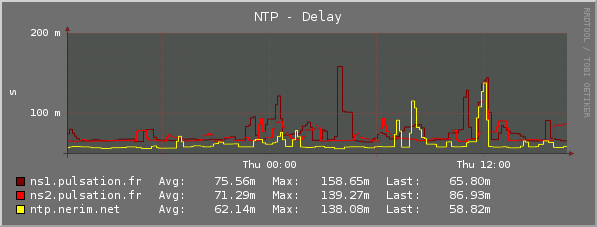
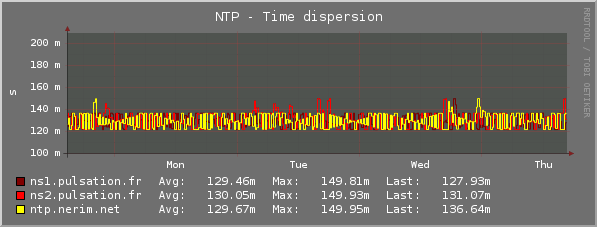
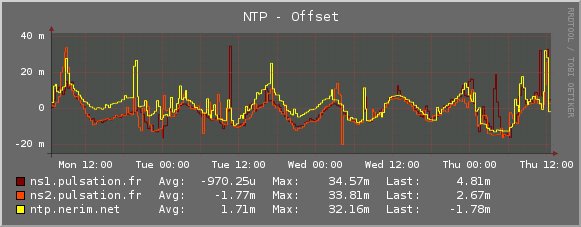
The NTPd plugin queries an NTP server (usually the local one, where statistics access is allowed) and extracts :
- "local" clock parameters :
- time offset
- error and offset loop
- parameters for each NTP server used to sync time
- offset
- dispersion
- delay
Details of the configuration can be found in the collectd.conf(5) manual page.
Synopsis
Parameters
| Name | Default | Multivalue | Required | Description |
|---|---|---|---|---|
| Host | localhost | No | No | Hostname or IP to collect NTP data from |
| Port | 123 | No | No | UDP port to collect NTP data from |
| ReverseLookups | True | No | No | If True report the peers with hostnames instead of IP addresses |
| IncludeUnitID | False | No | No | This option only exists for backward compatibility. If it is False and two ntpd peers use the same refclock driver, the plugin will try to write simultaneous measurements from both to the same type instance |
Example Graphs
Dependencies
- none
--Sebg 19:52, 26 February 2009 (UTC)
Configuration
Configuration options · from collectd.conf(5)
See this section in the full configuration reference
The ntpd plugin collects per-peer ntp data such as time offset and time dispersion.
For talking to ntpd, it mimics what the ntpdc control program does on the wire - using mode 7 specific requests. This mode is deprecated with newer ntpd releases (4.2.7p230 and later). For the ntpd plugin to work correctly with them, the ntp daemon must be explicitly configured to enable mode 7 (which is disabled by default). Refer to the ntp.conf(5) manual page for details.
Available configuration options for the ntpd plugin:
- Host Hostname
- Hostname of the host running ntpd. Defaults to localhost.
- Port Port
- UDP-Port to connect to. Defaults to 123.
- ReverseLookups true|false
- Sets whether or not to perform reverse lookups on peers. Since the name or IP-address may be used in a filename it is recommended to disable reverse lookups. The default is to do reverse lookups to preserve backwards compatibility, though.
- IncludeUnitID true|false
-
When a peer is a refclock, include the unit ID in the type instance. Defaults to false for backward compatibility.
If two refclock peers use the same driver and this is false, the plugin will try to write simultaneous measurements from both to the same type instance. This will result in error messages in the log and only one set of measurements making it through.