exec plugin
| Plugin name | exec |
| Type | other |
| Callbacks | config, init, notification, read, shutdown |
| Status | supported |
| Since | 4.0 |
| Copyright | 2007–2010 Florian “octo” Forster, 2007–2009 Sebastian Harl, 2008 Peter Holik |
| License | GPLv2 |
| Configuration | collectd.conf(5) |
Description
The Exec plugin executes scripts / applications and reads values back that are printed to STDOUT by that program. This allows you to extend the daemon in an easy and flexible way.
The downside is that executing external programs is very inefficient and always a potential security concern. collectd tries to counter these problems with the following options / mechanism:
It is ensured, that only one instance of the program is executed by collectd at any time. Because executed programs can submit as many values as they want, it is common to let the custom program run in a loop, so that they don't have to be started frequently. Especially with scripts this is a big performance gain, because the interpreter doesn't need to be started over and over again and the script is parsed only once. The required memory for the interpreter to stay in memory is the trade-off though.
Scripts that are implemented like that usually have the following form:
 HOSTNAME="${COLLECTD_HOSTNAME:-localhost}"
 INTERVAL="${COLLECTD_INTERVAL:-60}"

 while sleep "$INTERVAL"; do
   VALUE=do_magic()
   echo "PUTVAL \"$HOSTNAME/exec-magic/gauge-magic_level\" interval=$INTERVAL N:$VALUE"
 done
The security concerns are addressed by forcing the plugin to check that custom programs are never executed with superuser privileges. If the daemon runs as root, you have to configure another user ID with which the new process is created. To circumvent missing access privileges to files, you need to lean on the unix group concept. I.e. your script requires access to /var/log/messages, which is owned by root, its common practice to have this file being group readable by the admin-group. Given the used ID corrosponds to MyWatcherUser, you need to add that user to the admin group via /etc/group (or what else manages users / groups on your system).
This plugin is a generic plugin, i.e. it cannot work without configuration, because there is no reasonable default behavior. Please read the Plugin exec section of the collectd.conf(5) manual page for an in-depth description of the plugin's configuration. Information about the syntax the custom extension scripts must write to STDOUT can be found in the collectd-exec(5) manual page and on the Plain-text-protocol wiki page.
Environment
Starting with version-4.9 the Exec plugin sets the COLLECTD_INTERVAL and COLLECTD_HOSTNAME environment variables. The former is set to the global interval setting, the latter to the global hostname.
Synopsis
 <Plugin exec>
   Exec "myuser:mygroup" "myprog"
   Exec "otheruser" "/path/to/another/binary" "arg0" "arg1"
   NotificationExec "user" "/usr/lib/collectd/exec/handle_notification"
 </Plugin>
Example graph
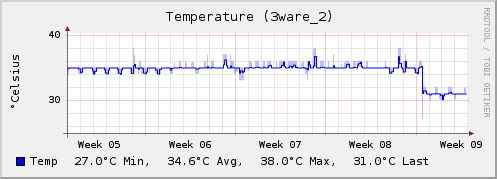
(Data for this graph was collected using the contrib/exec-smartctl script which can be found in contrib/.)
Example scripts
While the syntax required by the Exec plugin is documented in detail on the Plain-text-protocol page, example scripts are usually much easier to understand. The following scripts might be of interest for you:
- exec-munin.px plugin
- contrib/exec-nagios.px
- contrib/exec-smartctl
- haproxy.rb plugin
- haproxy-stat.sh plugin
- exec-redis.sh plugin
- exec-solusvm-bandwidth plugin
- The “Exec Plugins” category.
Dependencies
- none
Caveats
Output buffering
A lot of programming environments (I/O-libraries, script interpreters) use buffered I/O when writing to the standard output. This may mean that data you're printing to the collectd process may be delayed until a 4 kByte buffer gets filled (or something around that size), which can be several minutes later.
To avoid this problem is it advisable to flush this buffer before calling sleep. Many environments also provide means to disable buffering, for example the following will deactivate buffering on stdout using the standard C library:
 /* This needs to be done before *anything* is written to STDOUT! */
 status = setvbuf (stdout,
     /* buf  = */ NULL,
     /* mode = */ _IONBF, /* unbuffered */
     /* size = */ 0);
 if (status != 0)
 {
   perror ("setvbuf");
   exit (EXIT_FAILURE);
 }
This Perl snipped will enable automatic flushing after each write:
In Ruby you'd do something like:
Heads up: While this behavior is merely confusing when you include timestamps in your messages, it may lead to invalid value-lists if you use the N (now) abbreviation: Since the time is only filled in when collectd receives the values, it may be several minutes late. If the same identifier is contained in the buffer multiple times, all values will bear the same time stamp and all but the first value will be lost.
Heads up 2: The stdout macro, which is specified by POSIX and used by many environments as the underlying I/O mechanism, behaves differently when connected to a terminal and to a pipe: When connected to a terminal, the output is "line buffered", i.e. the buffer is flushed when a newline is printed. When connected to a pipe, the stream is "fully buffered", i.e. output is only actually written if a fixed size buffer is full. This means that the output can actually appear immediately when testing the code in the command line, but still suffer from the problem when actually running with collectd.
See also
- Plain-text-protocol
- Category "Exec Plugins", a list of plugins using the Exec plugin.
Example: KSM statistics
The exec-ksm.sh plugin reads information about Kernel Samepage Merging (KSM), a feature of the Linux kernel. KSM checks the virtual memory for duplicate blocks and, if it finds any, merges them. This is especially useful for systems hosting several virtual guests.
Synopsis
Example graphs
None yet. Add one now!
Dependencies
- Bash
- Exec plugin
See also
Example: Munin plugin bridge
The exec-munin.px plugin allows to use plugins that were written for Munin with collectd’s Exec plugin. Since the data models of Munin and collectd are quite different rewriting the plugins should be preferred over using this transition layer. Having more than one data-source for one data-set doesn’t work with this script, for example.
This script is included in the source code distribution as contrib/exec-munin.px.
Synopsis
- → See: [https://github.com/collectd/collectd/blob/main/contrib/exec-munin.conf contrib/exec-munin.conf'']
 # /etc/exec-munin.conf
 AddType temperature temperature

 Interval 300

 Script /usr/share/munin/plugins/ipmisens2
 Script /usr/share/munin/plugins/munin-sensors.pl
 LoadPlugin exec
 <Plugin exec>
   # userid plugin-executable plugin-args
   Exec "collectd" "/opt/collectd/bin/exec-munin.px"
 </Plugin>
Example graphs
None yet. Add one now!
Dependencies
- Perl
- Exec plugin
See also
Example: Redis statistics
The exec-redis.sh plugin reads statistics from Redis, a high-performance NoSQL data structure server with persistent storage.
Code
Create /etc/collectd/redis.sh and make it executable:
#!/bin/bash

HOSTNAME="${COLLECTD_HOSTNAME:-`hostname -f`}"
INTERVAL="${COLLECTD_INTERVAL:-10}"
PORT=6379

while sleep "$INTERVAL"
do

info=$(echo info|nc -w 1 127.0.0.1 $PORT)
connected_clients=$(echo "$info"|awk -F : '$1 == "connected_clients" {print $2}')
connected_slaves=$(echo "$info"|awk -F : '$1 == "connected_slaves" {print $2}')
uptime=$(echo "$info"|awk -F : '$1 == "uptime_in_seconds" {print $2}')
used_memory=$(echo "$info"|awk -F ":" '$1 == "used_memory" {print $2}'|sed -e 's/\r//')
changes_since_last_save=$(echo "$info"|awk -F : '$1 == "changes_since_last_save" {print $2}')
total_commands_processed=$(echo "$info"|awk -F : '$1 == "total_commands_processed" {print $2}')
keys=$(echo "$info"|egrep -e "^db0"|sed -e 's/^.\+:keys=//'|sed -e 's/,.\+//')

echo "PUTVAL $HOSTNAME/redis-$PORT/memcached_connections-clients interval=$INTERVAL N:$connected_clients"
echo "PUTVAL $HOSTNAME/redis-$PORT/memcached_connections-slaves interval=$INTERVAL N:$connected_slaves"
echo "PUTVAL $HOSTNAME/redis-$PORT/uptime interval=$INTERVAL N:$uptime"
echo "PUTVAL $HOSTNAME/redis-$PORT/df-memory interval=$INTERVAL N:$used_memory:U"
echo "PUTVAL $HOSTNAME/redis-$PORT/files-unsaved_changes interval=$INTERVAL N:$changes_since_last_save"
echo "PUTVAL $HOSTNAME/redis-$PORT/memcached_command-total interval=$INTERVAL N:$total_commands_processed"
echo "PUTVAL $HOSTNAME/redis-$PORT/memcached_items-db0 interval=$INTERVAL N:$keys"

done
Configuration
Configure the Exec plugin:
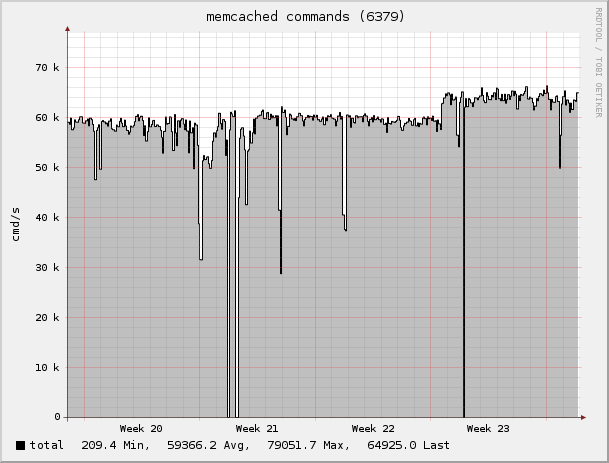
Example graph
Dependencies
- nc(1) (netcat)
- awk(1)
See also
- http://code.google.com/p/redis/ Homepage of Redis
- Python plugin based implementation at
powdahound/redis-collectd-plugin. - C-based implementation at Plugin-Redis.
Example: SolusVM bandwidth
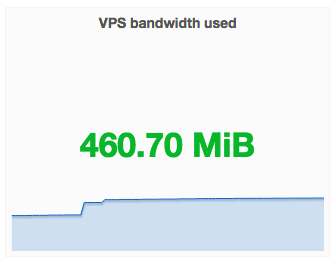
collectd-solusvm-bw.sh is a shell script which read bandwidth statistics from SolusVM, a common platform for VPS providers. The script requires the Exec plugin, curl and grep with -P (--perl-regexp support) to run and was written by Fredrik Lundhag.
Synopsis
To use this script, do the following:
- Download or copy the gist collectd-solusvm-bw.sh from GitHub into /etc/collectd.
- Enable API in the VPS SolusVM control panel, then copy your API key + hash and put them into the script together with the path to the API.
- I recommend you to run the script manually first to make sure that the output looks correct and that the API URL works.
- Add the section below the configuration of the Exec plugin:
Example graphs
Dependencies
- Plugin-Exec
- Bash
- grep (with -P, --perl-regexp support)
- curl
See also
Example: HAProxy statistics
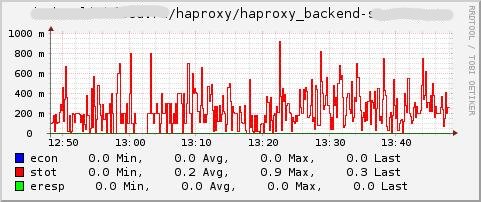
haproxy-stat.sh is a shell script which reads performance statistics from HAProxy, a free open-source load-balancing software for HTTP and TCP. The script requires the Exec plugin to run and was written by Oleg Blednov.
Code
 #!/bin/sh

 sock='/var/run/haproxy-stat'
 host="${COLLECTD_HOSTNAME}"
 pause="${COLLECTD_INTERVAL:-10}"

 while getopts "h:p:s:" c; do
    case $c in
        h)  host=$OPTARG;;
        p)  pause=$OPTARG;;
        s)  sock=$OPTARG;;
        *)  echo "Usage: $0 [-h <hostname>] [-p <seconds>] [-s <sockfile>]";;
    esac
 done

 while [ $? -eq 0 ]; do
    time="$(date +%s)"
    echo 'show stat' | socat - UNIX-CLIENT:$sock \
    |while IFS=',' read pxname svname qcur qmax scur smax slim stot bin bout dreq dresp ereq econ eresp wretr wredis status weight act bck chkfail chdown lastchg downtime qlimit pid iid sid throttle lbtot tracked type rate rate_lim rate_max check_status check_code check_duration hrsp_1xx hrsp_2xx hrsp_3xx hrsp_4xx hrsp_5xx hrsp_other hanafail req_rate req_rate_max req_tot cli_abrt srv_abrt; do
        [ "$svname" != 'BACKEND' ] && continue
        echo "PUTVAL $host/haproxy/haproxy_backend-$pxname $time:${stot:-0}:${econ:-0}:${eresp:-0}"
    done
    sleep $pause
 done
You can use any combination of HAProxy parameters (see read command in inner while loop).
Synopsis
To use this script add the following line to the configuration of the Exec plugin:
 Exec "haproxy:haproxy" "/etc/collectd/haproxy-stat.sh" \
      "-s" "/var/run/haproxy-stat" "-h" "localhost" "-p" "10"
And add next type in types.db:
haproxy_backend stot:COUNTER:0:U, econ:COUNTER:0:U, eresp:COUNTER:0:U
Example graphs
Dependencies
See also
Example: HAProxy statistics (Ruby)
The haproxy.rb plugin connects to the load balancing software HAproxy and requests status output. It parses the output and dispatches statistics (traffic, sessions) to collectd. The plugin is written by Ryan Schlesinger in Ruby and is used via the Exec plugin.
Synopsis
 LoadPlugin exec
 <Plugin exec>
   # userid plugin-executable plugin-args
   Exec "haproxy" "/usr/lib/collectd/plugins/haproxy" \
     "-s" "/home/haproxy/haproxy-stat" \
     "-i" "i-cfeba9a6" \
     "-e" "bck_lb" \
     "-n" "www" \
     "-w" "10"
 </Plugin>
Example graphs
None yet. Add one now!
Dependencies
- Ruby
- Exec plugin
External links
- http://github.com/ryansch/haproxy-collectd-plugin Official Git repository at GitHub
Configuration
Configuration options · from collectd.conf(5)
See this section in the full configuration reference
Please make sure to read collectd-exec(5) before using this plugin. It contains valuable information on when the executable is executed and the output that is expected from it.
- Exec User[:[Group]] Executable [<argE<gt> [<argE<gt> ...]]
- NotificationExec User[:[Group]] Executable [<argE<gt> [<argE<gt> ...]]
-
Execute the executable Executable as user User. If the user name is followed by a colon and a group name, the effective group is set to that group. The real group and saved-set group will be set to the default group of that user. If no group is given the effective group ID will be the same as the real group ID.
Please note that in order to change the user and/or group the daemon needs superuser privileges. If the daemon is run as an unprivileged user you must specify the same user/group here. If the daemon is run with superuser privileges, you must supply a non-root user here.
The executable may be followed by optional arguments that are passed to the program. Please note that due to the configuration parsing numbers and boolean values may be changed. If you want to be absolutely sure that something is passed as-is please enclose it in quotes.
The Exec and NotificationExec statements change the semantics of the programs executed, i. e. the data passed to them and the response expected from them. This is documented in great detail in collectd-exec(5).