cpufreq plugin
| Plugin name | cpufreq |
| Type | read |
| Callbacks | init, read |
| Status | supported |
| Since | 3.4 |
| Copyright | 2005–2007 Peter Holik |
| Configuration | collectd.conf(5) |
Description
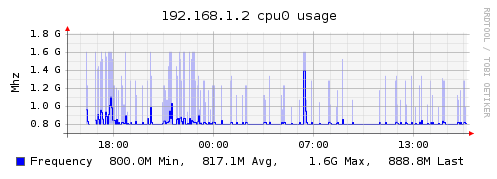
The CPUFreq plugin collects the current CPU's frequency, mostly for mobile computers.
Example graph
Dependencies
- Linux
/sys/devices/system/cpu/cpu0/cpufreq/scaling_cur_freq
Configuration
Configuration options · from collectd.conf(5)
See this section in the full configuration reference
This plugin is available on Linux and FreeBSD only. It doesn't have any options. On Linux it reads /sys/devices/system/cpu/cpu0/cpufreq/scaling_cur_freq (for the first CPU installed) to get the current CPU frequency. If this file does not exist make sure cpufreqd (http://cpufreqd.sourceforge.net/) or a similar tool is installed and an "cpu governor" (that's a kernel module) is loaded.
On Linux, if the system has the cpufreq-stats kernel module loaded, this plugin reports the rate of p-state (cpu frequency) transitions and the percentage of time spent in each p-state.
On FreeBSD it does a sysctl dev.cpu.0.freq and submits this as instance 0. At this time FreeBSD only has one frequency setting for all cores. See the BUGS section in the FreeBSD man page for cpufreq(4) for more details.
On FreeBSD the plugin checks the success of sysctl dev.cpu.0.freq and unregisters the plugin when this fails. A message will be logged to indicate this.