iptables plugin
| Plugin name | iptables |
| Type | read |
| Callbacks | config, read, shutdown |
| Status | supported |
| Since | 4.0 |
| Copyright | 2007 Sjoerd van der Berg, 2007 Florian octo Forster, 2009 Marco Chiappero |
| Configuration | collectd.conf(5) |
The IP-Tables plugin can gather statistics from your ip_tables based packet filter (aka. firewall) for both the IPv4 and the IPv6 protocol. It can collect the byte- and packet-counters of selected rules and submit them to collectd. You can select rules that should be collected either by their position (e. g. “the fourth rule in the ‘INPUT’ queue in the ‘filter’ table”) or by its comment (using the “COMMENT” match). This means that depending on your firewall layout you can collect certain services (such as the amount of web-traffic), source or destination hosts or networks, dropped packets and much more.
Of course this plugin uses libiptc and does not fork the iptables(8) / ip6tables(8) application. This means that it is talking directly with the kernel and the overhead is as low as it gets.
This plugin is a generic plugin, i.e. it cannot work without configuration, because there is no reasonable default behavior. Please read the Plugin iptables section of the collectd.conf(5) manual page for an in-depth description of the plugin's configuration.
Synopsis
 <Plugin "iptables">
   Chain "filter" "FORWARD"
   Chain6 "filter" "OUTPUT"
   Chain  "filter" "FORWARD" "MatchThisComment"
 </Plugin>
inspecting iptables
by issuing
iptables -L -nvx
you can get the current state of your system which may look like this:
  Chain INPUT (policy DROP 502 packets, 46104 bytes)
      pkts      bytes target     prot opt in     out     source               destination
         0        0 DROP       all  --  *      *       0.0.0.0/0            0.0.0.0/0            state INVALID
      2153   829063 ACCEPT     all  --  *      *       0.0.0.0/0            0.0.0.0/0            state RELATED,ESTABLISHED
         0        0 ACCEPT     all  --  lo     *       0.0.0.0/0            0.0.0.0/0
         0        0 ACCEPT     icmp --  *      *       0.0.0.0/0            0.0.0.0/0
         0        0 ACCEPT     udp  --  *      *       0.0.0.0/0            0.0.0.0/0            udp dpt:500
         0        0 ACCEPT     esp  --  *      *       0.0.0.0/0            0.0.0.0/0
         0        0 ACCEPT     ah   --  *      *       0.0.0.0/0            0.0.0.0/0
         0        0 ACCEPT     tcp  --  *      *       0.0.0.0/0            0.0.0.0/0            tcp dpt:22

  Chain FORWARD (policy DROP 0 packets, 0 bytes)
      pkts      bytes target     prot opt in     out     source               destination
         0        0 ACCEPT     tcp  --  *      *       0.0.0.0/0            0.0.0.0/0            tcp dpt:666 /* MatchThisComment */
         0        0 DROP       all  --  *      *       0.0.0.0/0            0.0.0.0/0            state INVALID
         0        0 ACCEPT     all  --  *      *       0.0.0.0/0            0.0.0.0/0            state RELATED,ESTABLISHED

  Chain OUTPUT (policy ACCEPT 1121 packets, 77622 bytes)
      pkts      bytes target     prot opt in     out     source               destination
      1280   477409 ACCEPT     all  --  *      *       0.0.0.0/0            0.0.0.0/0            state RELATED,ESTABLISHED
Example graphs
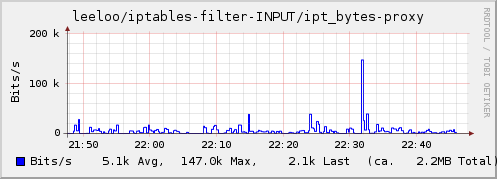
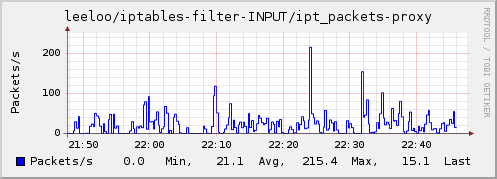
Dependencies
- Linux 2.4 or later with ip_tables
libiptc
Shipped libiptc
Linking with the libiptc has not been easy, unfortunately. Because that library used to be meant for internal use only, it was only available as a static library on many distributions. Linking a static library into a shared library requires special flags (-fPIC, → FAQs) being used when building the static library, which was often not the case.
Then libiptc was cleaned up and declared an official library. This means that many distributions now ship it as a shared library which can be linked with nicely, it now supports pkg-config and in general the world got brighter. The name of the package is usually something like iptables-dev. However, the interface has changed in a backwards incompatible way.
To avoid the problems of the “old” version, collectd ships an own version of libiptc as a fallback solution. If your distribution does not provide the library or a broken version, the shipped library is used. You can force to use the shipped library using the --with-libiptc=shipped configure option. (This feature is not yet released and will be included in the 4.8.1 and 4.7.4 releases.) The shipped version in turn requires certain header files which originate from the Linux kernel. Kernel headers need to be specifically prepared to be used in userspace, hence the headers are only looked for in standard include directories. You need to install those userland versions of the kernel headers in order to use the shipped libiptc. Under Debian, the package name for these headers is linux-libc-dev.
So you're basically left with three options:
- Install the “new” version of libiptc (“iptables-dev” or similar).
- Install an “old” version of libiptc if it is used with the appropriate flags or use an architecture which doesn't care.
- Install the userland versions of the kernel headers (“linux-libc-dev” or similar). The needed header files are:
linux/netfilter_ipv4/ip_tables.hlinux/netfilter_ipv6/ip6_tables.hlinux/netfilter/x_tables.h
See also
Other network related plugins:
Other resources on the web:
- The Linux Advanced Routing & Traffic Control Howto
- Ferm firewall scripting engine
- Ipaccounting with iptables & AWK
Real examples of deployment
How to marry shorewall accounting and collectd
There is a clear HOWTO enable traffic accounting using Shorewall, a high-level tool for configuring IP-Tables. It gives you nice a overview of the usage in command line, but unfortunately counters are gone after Shorewall or the server are restarted.
The idea is to mix standard Shorewall accounting with collectd to have cute and accurate graphs.
Notice: The shorewall-perl package is required.
A standard accounting file looks like this:
 #ACTION         CHAIN   SOURCE          DESTINATION
 #
 scigacz:COUNT   -       -               81.218.94.95/32
 scigacz:COUNT   -       81.218.94.95/32 -
 DONE            scigacz
To adapt it to collectd's IP-Tables plugin, you need to add comments to the IP-Tables rules:
 #ACTION         CHAIN   SOURCE          DESTINATION
 #
 COMMENT akonetin
 scigacz:COUNT   -       -               81.218.94.95/32
 COMMENT akonetout
 scigacz:COUNT   -       81.218.94.95/32 -
 COMMENT
 DONE            scigacz
And then add a proper entry to collectd.conf:
That's all! Now you are logging separately in and out traffic into RRD files:
 iptables-filter-accounting/ipt_bytes-akonetin.rrd
 iptables-filter-accounting/ipt_bytes-akonetout.rrd
 iptables-filter-accounting/ipt_packets-akonetin.rrd
 iptables-filter-accounting/ipt_packets-akonetout.rrd
And, finally you can use your graphing engine to achieve such a nice graph:
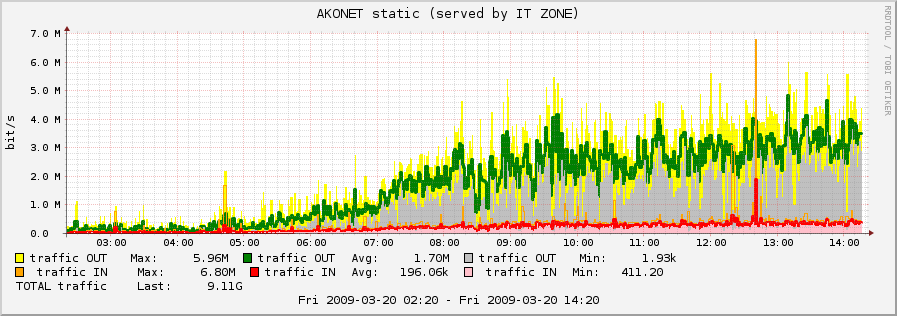
--SergiuszPawlowicz 14:21, 20 March 2009 (UTC)
How to do accounting with ferm and collectd
Another widespread firewall utility generating very readable and compact firewalls is the ferm iptables fronted; We will expand the default debian config to use it with collectd for counting:
  @def &TCP_ACCOUNTING($PORT, $COMMENT, $SRCCHAIN) = {
      @def $FULLCOMMENT=@cat($COMMENT, "_", $SRCCHAIN);
      dport $PORT mod comment comment $FULLCOMMENT NOP;
  }

  @def &WEBSERVER_ACCOUNTING($CHAINNAME) = {
  # Htp:
      &TCP_ACCOUNTING(80, "http_plain", $CHAINNAME);
  # Https:
      &TCP_ACCOUNTING(443, "http_ssl", $CHAINNAME);
  }

  table filter {
      chain INPUT {
          proto tcp dport 1:1000 @subchain "Accounting" {
              &WEBSERVER_ACCOUNTING("input");
          }
          policy DROP;

          # connection tracking
          mod state state INVALID DROP;
          mod state state (ESTABLISHED RELATED) ACCEPT;

          # allow local packet
          interface lo ACCEPT;

          # respond to ping
          proto icmp ACCEPT;

          # allow IPsec
          proto udp dport 500 ACCEPT;
          proto (esp ah) ACCEPT;

          # allow SSH connections
          proto tcp dport ssh ACCEPT;
      }
      chain OUTPUT {
          policy ACCEPT;

          proto tcp dport 1:1000 @subchain "Accounting" {
              &WEBSERVER_ACCOUNTING("output");
          }

          # connection tracking
          #mod state state INVALID DROP;
          mod state state (ESTABLISHED RELATED) ACCEPT;
      }
      chain FORWARD {
          policy DROP;

          # connection tracking
          mod state state INVALID DROP;
          mod state state (ESTABLISHED RELATED) ACCEPT;
      }
  }
As you can inspect using iptables -N -nxv we can generate a match linke this:
  <Plugin iptables>
    Chain filter "Accounting" "http_ssl_input"
    Chain filter "Accounting" "http_plain_input"
    Chain filter "Accounting" "http_ssl_output"
    Chain filter "Accounting" "http_plain_output"
  </Plugin>
Configuration
Configuration options · from collectd.conf(5)
See this section in the full configuration reference
- Chain Table Chain [Comment|Number [Name]]
- Chain6 Table Chain [Comment|Number [Name]]
-
Select the iptables/ip6tables filter rules to count packets and bytes from.
If only Table and Chain are given, this plugin will collect the counters of all rules which have a comment-match. The comment is then used as type-instance.
If Comment or Number is given, only the rule with the matching comment or the nth rule will be collected. Again, the comment (or the number) will be used as the type-instance.
If Name is supplied, it will be used as the type-instance instead of the comment or the number.