openvpn plugin
| Plugin name | openvpn |
| Type | read |
| Callbacks | config, read |
| Status | supported |
| Since | 4.6 |
| Copyright | 2008 Doug MacEachern, 2009 Florian octo Forster, 2009 Marco Chiappero |
| License | GPLv2 |
| Configuration | collectd.conf(5) |
The OpenVPN plugin reads the status file printed by OpenVPN, an open source SSL VPN solution. If OpenVPN is configured to run in Server mode (sometimes known as multi mode, too), RX and TX statistics for each connected client are collected. If compression is activated, compression statistics are collected.
Synopsis
 <Plugin "openvpn">
  StatusFile "/var/log/openvpn-status.log"
  StatusFile "/var/log/openvpn-status_pp.log"
  StatusFile "/var/log/openvpn-status_udp.log"
  StatusFile "/var/log/openvpn-status_wlan.log"
  #
  # Since 23. March 2010
  # http://github.com/octo/collectd/commit/f4c25b4b234ba63fb9b15c2219d55d8af3e3f39d
  #
  # Collect one RRD for each logged in user
  CollectIndividualUsers false
  #
  # Aggregate number of connected users
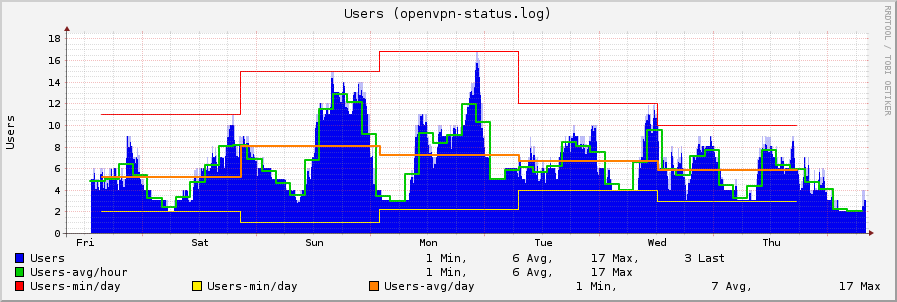
  CollectUserCount true
  #
  # Store compression statistics
  CollectCompression false
  #
  # Use new NamingSchema
  ImprovedNamingSchema false
 </Plugin>
Example graphs
Dependencies
- none
Configuration
Configuration options · from collectd.conf(5)
See this section in the full configuration reference
The OpenVPN plugin reads a status file maintained by OpenVPN and gathers traffic statistics about connected clients.
To set up OpenVPN to write to the status file periodically, use the --status option of OpenVPN.
So, in a nutshell you need:
Available options:
- StatusFile File
- Specifies the location of the status file.
- ImprovedNamingSchema true|false
- When enabled, the filename of the status file will be used as plugin instance and the client's "common name" will be used as type instance. This is required when reading multiple status files. Enabling this option is recommended, but to maintain backwards compatibility this option is disabled by default.
- CollectCompression true|false
- Sets whether or not statistics about the compression used by OpenVPN should be collected. This information is only available in single mode. Enabled by default.
- CollectIndividualUsers true|false
- Sets whether or not traffic information is collected for each connected client individually. If set to false, currently no traffic data is collected at all because aggregating this data in a save manner is tricky. Defaults to true.
- CollectUserCount true|false
- When enabled, the number of currently connected clients or users is collected. This is especially interesting when CollectIndividualUsers is disabled, but can be configured independently from that option. Defaults to false.