postgresql plugin
| Plugin name | postgresql |
| Type | read |
| Callbacks | config, init, read, write, shutdown |
| Status | supported |
| Since | 4.5 |
| Copyright | 2008–2012 Sebastian Harl, 2009 Florian Forster |
| License | MIT License |
| Configuration | collectd.conf(5) |
The PostgreSQL plugin connects to and executes SQL statements on a PostgreSQL database. It then reads back the results and, depending on the configuration, the returned values are then converted into collectd “value lists” (the data structure used internally to pass statistics around). This plugin is a generic plugin, i.e. it cannot work without configuration, because there is no reasonable default behavior. Please read the Plugin postgresql section of the collectd.conf(5) manual page for an in-depth description of the plugin's configuration.
The configuration syntax of the PostgreSQL, DBI, and Oracle plugins is very similar, because the configuration of those plugins is handled by the same module. Also, we tried to keep the syntax similar to that of the SNMP plugin. So if you use any of those plugins already, most of the following will look familiar.
Synopsis
 <Plugin postgresql>
   <Query magic>
     Statement "SELECT magic FROM wizard WHERE host = $1;"
     Param hostname
     <Result>
       Type gauge
       InstancePrefix "magic"
       ValuesFrom magic
     </Result>
   </Query>

   <Query rt36_tickets>
     Statement "SELECT COUNT(type) AS count, type \
                       FROM (SELECT CASE \
                                    WHEN resolved = 'epoch' THEN 'open' \
                                    ELSE 'resolved' END AS type \
                                    FROM tickets) type \
                       GROUP BY type;"
     <Result>
       Type counter
       InstancePrefix "rt36_tickets"
       InstancesFrom "type"
       ValuesFrom "count"
     </Result>
   </Query>

   <Database foo>
     Host "hostname"
     Port "5432"
     User "username"
     Password "secret"
     SSLMode "prefer"
     KRBSrvName "kerberos_service_name"
     Query magic
   </Database>

   <Database bar>
     Service "service_name"
     Query backend # predefined
     Query rt36_tickets
   </Database>
 </Plugin>
Example graphs
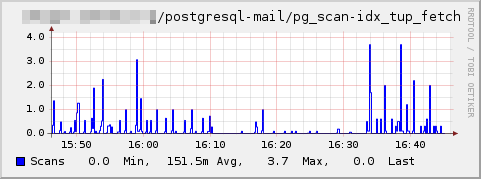
Dependencies
libpq(The PostgreSQL C client library.)
See also
Configuration
Configuration options · from collectd.conf(5)
See this section in the full configuration reference
The postgresql plugin queries statistics from PostgreSQL databases. It keeps a persistent connection to all configured databases and tries to reconnect if the connection has been interrupted. A database is configured by specifying a Database block as described below. The default statistics are collected from PostgreSQL's statistics collector which thus has to be enabled for this plugin to work correctly. This should usually be the case by default. See the section "The Statistics Collector" of the PostgreSQL Documentation for details.
By specifying custom database queries using a Query block as described below, you may collect any data that is available from some PostgreSQL database. This way, you are able to access statistics of external daemons which are available in a PostgreSQL database or use future or special statistics provided by PostgreSQL without the need to upgrade your collectd installation.
Starting with version 5.2, the postgresql plugin supports writing data to PostgreSQL databases as well. This has been implemented in a generic way. You need to specify an SQL statement which will then be executed by collectd in order to write the data (see below for details). The benefit of that approach is that there is no fixed database layout. Rather, the layout may be optimized for the current setup.
The PostgreSQL Documentation manual can be found at http://www.postgresql.org/docs/manuals/.
<Plugin postgresql>
  <Query magic>
    Statement "SELECT magic FROM wizard WHERE host = $1;"
    Param hostname
    <Result>
      Type gauge
      InstancePrefix "magic"
      ValuesFrom magic
    </Result>
  </Query>

<Query rt36_tickets>
  Statement "SELECT COUNT(type) AS count, type \
                    FROM (SELECT CASE \
                                 WHEN resolved = 'epoch' THEN 'open' \
                                 ELSE 'resolved' END AS type \
                                 FROM tickets) type \
                    GROUP BY type;"
  <Result>
    Type counter
    InstancePrefix "rt36_tickets"
    InstancesFrom "type"
    ValuesFrom "count"
  </Result>
</Query>

<Writer sqlstore>
  Statement "SELECT collectd_insert($1, $2, $3, $4, $5, $6, $7, $8, $9);"
  StoreRates true
</Writer>

<Database foo>
  Plugin "kingdom"
  Host "hostname"
  Port "5432"
  User "username"
  Password "secret"
  SSLMode "prefer"
  KRBSrvName "kerberos_service_name"
  Query magic
</Database>

<Database bar>
  Interval 300
  Service "service_name"
  Query backends # predefined
  Query rt36_tickets
</Database>

  <Database qux>
    # ...
    Writer sqlstore
    CommitInterval 10
  </Database>
</Plugin>
The Query block defines one database query which may later be used by a database definition. It accepts a single mandatory argument which specifies the name of the query. The names of all queries have to be unique (see the MinVersion and MaxVersion options below for an exception to this rule).
In each Query block, there is one or more Result blocks. Multiple Result blocks may be used to extract multiple values from a single query.
The following configuration options are available to define the query:
- Statement sql query statement
-
Specify the sql query statement which the plugin should execute. The string may contain the tokens $1, $2, etc. which are used to reference the first, second, etc. parameter. The value of the parameters is specified by the Param configuration option - see below for details. To include a literal $ character followed by a number, surround it with single quotes (').
Any SQL command which may return data (such as
SELECTorSHOW) is allowed. Note, however, that only a single command may be used. Semicolons are allowed as long as a single non-empty command has been specified only.The returned lines will be handled separately one after another.
- Param hostname|database|instance|username|interval
-
Specify the parameters which should be passed to the SQL query. The parameters are referred to in the SQL query as $1, $2, etc. in the same order as they appear in the configuration file. The value of the parameter is determined depending on the value of the Param option as follows:
- hostname
- The configured hostname of the database connection. If a UNIX domain socket is used, the parameter expands to "localhost".
- database
- The name of the database of the current connection.
- instance
- The name of the database plugin instance. See the Instance option of the database specification below for details.
- username
- The username used to connect to the database.
- interval
- The interval with which this database is queried (as specified by the database specific or global Interval options).
Please note that parameters are only supported by PostgreSQL's protocol version 3 and above which was introduced in version 7.4 of PostgreSQL.
- PluginInstanceFrom column
- Specify how to create the "PluginInstance" for reporting this query results. Only one column is supported. You may concatenate fields and string values in the query statement to get the required results.
- MinVersion version
- MaxVersion version
-
Specify the minimum or maximum version of PostgreSQL that this query should be used with. Some statistics might only be available with certain versions of PostgreSQL. This allows you to specify multiple queries with the same name but which apply to different versions, thus allowing you to use the same configuration in a heterogeneous environment.
The version has to be specified as the concatenation of the major, minor and patch-level versions, each represented as two-decimal-digit numbers. For example, version 8.2.3 will become 80203.
The Result block defines how to handle the values returned from the query. It defines which column holds which value and how to dispatch that value to the daemon.
- Type type
-
The type name to be used when dispatching the values. The type describes how to handle the data and where to store it. See types.db(5) for more details on types and their configuration. The number and type of values (as selected by the ValuesFrom option) has to match the type of the given name.
This option is mandatory.
- InstancePrefix prefix
- InstancesFrom column0 [column1 ...]
-
Specify how to create the "TypeInstance" for each data set (i. e. line). InstancePrefix defines a static prefix that will be prepended to all type instances. InstancesFrom defines the column names whose values will be used to create the type instance. Multiple values will be joined together using the hyphen (
-) as separation character.The plugin itself does not check whether or not all built instances are different. It is your responsibility to assure that each is unique.
Both options are optional. If none is specified, the type instance will be empty.
- ValuesFrom column0 [column1 ...]
-
Names the columns whose content is used as the actual data for the data sets that are dispatched to the daemon. How many such columns you need is determined by the Type setting as explained above. If you specify too many or not enough columns, the plugin will complain about that and no data will be submitted to the daemon.
The actual data type, as seen by PostgreSQL, is not that important as long as it represents numbers. The plugin will automatically cast the values to the right type if it know how to do that. For that, it uses the
strtoll(3)andstrtod(3)functions, so anything supported by those functions is supported by the plugin as well.This option is required inside a Result block and may be specified multiple times. If multiple ValuesFrom options are specified, the columns are read in the given order.
The following predefined queries are available (the definitions can be found in the postgresql_default.conf file which, by default, is available at prefix/share/collectd/):
- backends
- This query collects the number of backends, i. e. the number of connected clients.
- transactions
- This query collects the numbers of committed and rolled-back transactions of the user tables.
- queries
- This query collects the numbers of various table modifications (i. e. insertions, updates, deletions) of the user tables.
- query_plans
- This query collects the numbers of various table scans and returned tuples of the user tables.
- table_states
- This query collects the numbers of live and dead rows in the user tables.
- disk_io
- This query collects disk block access counts for user tables.
- disk_usage
- This query collects the on-disk size of the database in bytes.
In addition, the following detailed queries are available by default. Please note that each of those queries collects information by table, thus, potentially producing a lot of data. For details see the description of the non-by_table queries above.
- queries_by_table
- query_plans_by_table
- table_states_by_table
- disk_io_by_table
The Writer block defines a PostgreSQL writer backend. It accepts a single mandatory argument specifying the name of the writer. This will then be used in the Database specification in order to activate the writer instance. The names of all writers have to be unique. The following options may be specified:
- Statement sql statement
-
This mandatory option specifies the SQL statement that will be executed for each submitted value. A single SQL statement is allowed only. Anything after the first semicolon will be ignored.
Nine parameters will be passed to the statement and should be specified as tokens $1, $2, through $9 in the statement string. The following values are made available through those parameters:
- $1
- The timestamp of the queried value as an RFC 3339-formatted local time.
- $2
- The hostname of the queried value.
- $3
- The plugin name of the queried value.
- $4
- The plugin instance of the queried value. This value may be NULL if there is no plugin instance.
- $5
- The type of the queried value (cf. types.db(5)).
- $6
- The type instance of the queried value. This value may be NULL if there is no type instance.
- $7
- An array of names for the submitted values (i. e., the name of the data sources of the submitted value-list).
- $8
- An array of types for the submitted values (i. e., the type of the data sources of the submitted value-list;
counter,gauge, ...). Note, that if StoreRates is enabled (which is the default, see below), all types will begauge. - $9
- An array of the submitted values. The dimensions of the value name and value arrays match.
In general, it is advisable to create and call a custom function in the PostgreSQL database for this purpose. Any procedural language supported by PostgreSQL will do (see chapter "Server Programming" in the PostgreSQL manual for details).
- StoreRates false|true
- If set to true (the default), convert counter values to rates. If set to false counter values are stored as is, i. e. as an increasing integer number.
The Database block defines one PostgreSQL database for which to collect statistics. It accepts a single mandatory argument which specifies the database name. None of the other options are required. PostgreSQL will use default values as documented in the section "CONNECTING TO A DATABASE" in the psql(1) manpage. However, be aware that those defaults may be influenced by the user collectd is run as and special environment variables. See the manpage for details.
- Interval seconds
- Specify the interval with which the database should be queried. The default is to use the global Interval setting.
- CommitInterval seconds
- This option may be used for database connections which have "writers" assigned (see above). If specified, it causes a writer to put several updates into a single transaction. This transaction will last for the specified amount of time. By default, each update will be executed in a separate transaction. Each transaction generates a fair amount of overhead which can, thus, be reduced by activating this option. The draw-back is, that data covering the specified amount of time will be lost, for example, if a single statement within the transaction fails or if the database server crashes.
- Plugin Plugin
- Use Plugin as the plugin name when submitting query results from this Database. Defaults to
postgresql. - Instance name
- Specify the plugin instance name that should be used instead of the database name (which is the default, if this option has not been specified). This allows one to query multiple databases of the same name on the same host (e.g. when running multiple database server versions in parallel). The plugin instance name can also be set from the query result using the PluginInstanceFrom option in Query block.
- Host hostname
-
Specify the hostname or IP of the PostgreSQL server to connect to. If the value begins with a slash, it is interpreted as the directory name in which to look for the UNIX domain socket.
This option is also used to determine the hostname that is associated with a collected data set. If it has been omitted or either begins with with a slash or equals localhost it will be replaced with the global hostname definition of collectd. Any other value will be passed literally to collectd when dispatching values. Also see the global Hostname and FQDNLookup options.
- Port port
- Specify the TCP port or the local UNIX domain socket file extension of the server.
- User username
- Specify the username to be used when connecting to the server.
- Password password
- Specify the password to be used when connecting to the server.
- ExpireDelay delay
- Skip expired values in query output.
- SSLMode disable|allow|prefer|require
-
Specify whether to use an SSL connection when contacting the server. The following modes are supported:
- disable
- Do not use SSL at all.
- allow
- First, try to connect without using SSL. If that fails, try using SSL.
- prefer (default)
- First, try to connect using SSL. If that fails, try without using SSL.
- require
- Use SSL only.
- Instance name
- Specify the plugin instance name that should be used instead of the database name (which is the default, if this option has not been specified). This allows one to query multiple databases of the same name on the same host (e.g. when running multiple database server versions in parallel).
- KRBSrvName kerberos_service_name
- Specify the Kerberos service name to use when authenticating with Kerberos 5 or GSSAPI. See the sections "Kerberos authentication" and "GSSAPI" of the PostgreSQL Documentation for details.
- Service service_name
- Specify the PostgreSQL service name to use for additional parameters. That service has to be defined in
pg_service.confand holds additional connection parameters. See the section "The Connection Service File" in the PostgreSQL Documentation for details. - Query query
- Specifies a query which should be executed in the context of the database connection. This may be any of the predefined or user-defined queries. If no such option is given, it defaults to "backends", "transactions", "queries", "query_plans", "table_states", "disk_io" and "disk_usage" (unless a Writer has been specified). Else, the specified queries are used only.
- Writer writer
-
Assigns the specified writer backend to the database connection. This causes all collected data to be send to the database using the settings defined in the writer configuration (see the section "FILTER CONFIGURATION" below for details on how to selectively send data to certain plugins).
Each writer will register a flush callback which may be used when having long transactions enabled (see the CommitInterval option above). When issuing the FLUSH command (see collectd-unixsock(5) for details) the current transaction will be committed right away. Two different kinds of flush callbacks are available with the
postgresqlplugin:- postgresql
- Flush all writer backends.
- postgresql-database
- Flush all writers of the specified database only.