routeros plugin
| Plugin name | routeros |
| Type | read |
| Callbacks | config, read |
| Status | supported |
| Since | 4.9 |
| Copyright | 2009–2010 Florian Forster |
| License | MIT License |
| Configuration | collectd.conf(5) |
The RouterOS plugin connects to a device running RouterOS, the Linux-based operating system for routers by MikroTik. The plugin uses librouteros to connect and reads information about the interfaces and wireless connections of the device. The configuration supports querying multiple routers.
This plugin is a generic plugin, i.e. it cannot work without configuration, because there is no reasonable default behavior. Please read the Plugin routeros section of the collectd.conf(5) manual page for an in-depth description of the plugin's configuration.
Synopsis
 <Plugin "routeros">
   <Router>
     Host "router0.example.com"
     User "collectd"
     Password "secr3t"
   </Router>
   <Router>
     Host "router1.example.com"
     User "collectd"
     Password "5ecret"
   </Router>
 </Plugin>
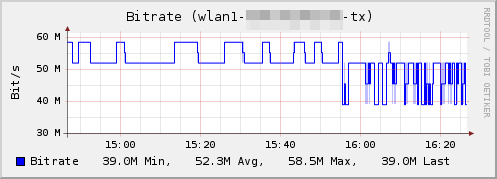
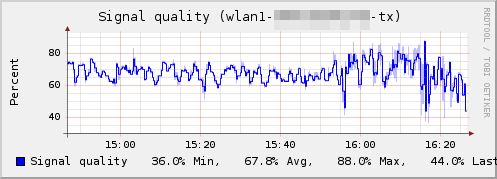
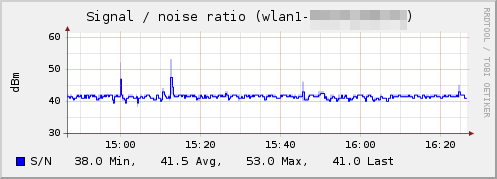
Example graph
Dependencies
See also
- MikroTik's homepage
- Page “MikroTik RouterOS” in MikroTik's wiki
- Page “librouteros” in MikroTik's wiki
- Announcement in the MikroTik forum
Configuration
Configuration options · from collectd.conf(5)
See this section in the full configuration reference
The routeros plugin connects to a device running RouterOS, the Linux-based operating system for routers by MikroTik. The plugin uses librouteros to connect and reads information about the interfaces and wireless connections of the device. The configuration supports querying multiple routers:
<Plugin "routeros">
  <Router>
    Host "router0.example.com"
    User "collectd"
    Password "secr3t"
    CollectInterface true
    CollectCPULoad true
    CollectMemory true
  </Router>
  <Router>
    Host "router1.example.com"
    User "collectd"
    Password "5ecret"
    CollectInterface true
    CollectRegistrationTable true
    CollectDF true
    CollectDisk true
    CollectHealth true
  </Router>
</Plugin>
As you can see above, the configuration of the routeros plugin consists of one or more <RouterE<gt> blocks. Within each block, the following options are understood:
- Host Host
- Hostname or IP-address of the router to connect to.
- Port Port
- Port name or port number used when connecting. If left unspecified, the default will be chosen by librouteros, currently "8728". This option expects a string argument, even when a numeric port number is given.
- User User
- Use the user name User to authenticate. Defaults to "admin".
- Password Password
- Set the password used to authenticate.
- CollectInterface true|false
- When set to true, interface statistics will be collected for all interfaces present on the device. Defaults to false.
- CollectRegistrationTable true|false
- When set to true, information about wireless LAN connections will be collected. Defaults to false.
- CollectCPULoad true|false
- When set to true, information about the CPU usage will be collected. The number is a dimensionless value where zero indicates no CPU usage at all. Defaults to false.
- CollectMemory true|false
- When enabled, the amount of used and free memory will be collected. How used memory is calculated is unknown, for example whether or not caches are counted as used space. Defaults to false.
- CollectDF true|false
- When enabled, the amount of used and free disk space will be collected. Defaults to false.
- CollectDisk true|false
- When enabled, the number of sectors written and bad blocks will be collected. Defaults to false.
- CollectHealth true|false
- When enabled, the health statistics will be collected. This includes the voltage and temperature on supported hardware. Defaults to false.