onewire plugin
| Plugin name | onewire |
| Type | read |
| Callbacks | config, init, read, shutdown |
| Status | experimental |
| Since | 4.5 |
| Copyright | 2008 Florian octo Forster |
| License | GPLv2 |
| Configuration | collectd.conf(5) |
The experimental OneWire plugin collects temperature information from sensors connected to the computer over the OneWire bus. It uses the owfs library for communication.
The plugin can easily be extended to support other metrics than temperatures, too. Humidity and air pressure appear to be common uses for OneWire sensors. Due to a lack of such sensors, support has not yet been implemented.
Synopsis
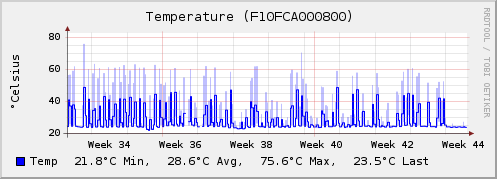
Example graph
Dependencies
Configuration
Configuration options · from collectd.conf(5)
See this section in the full configuration reference
EXPERIMENTAL! See notes below.
The onewire plugin uses the owcapi library from the owfs project http://owfs.org/ to read sensors connected via the onewire bus.
It can be used in two possible modes - standard or advanced.
In the standard mode only temperature sensors (sensors with the family code 10, 22 and 28 - e.g. DS1820, DS18S20, DS1920) can be read. If you have other sensors you would like to have included, please send a sort request to the mailing list. You can select sensors to be read or to be ignored depending on the option IgnoreSelected). When no list is provided the whole bus is walked and all sensors are read.
Hubs (the DS2409 chips) are working, but read the note, why this plugin is experimental, below.
In the advanced mode you can configure any sensor to be read (only numerical value) using full OWFS path (e.g. "/uncached/10.F10FCA000800/temperature"). In this mode you have to list all the sensors. Neither default bus walk nor IgnoreSelected are used here. Address and type (file) is extracted from the path automatically and should produce compatible structure with the "standard" mode (basically the path is expected as for example "/uncached/10.F10FCA000800/temperature" where it would extract address part "F10FCA000800" and the rest after the slash is considered the type - here "temperature"). There are two advantages to this mode - you can access virtually any sensor (not just temperature), select whether to use cached or directly read values and it is slighlty faster. The downside is more complex configuration.
The two modes are distinguished automatically by the format of the address. It is not possible to mix the two modes. Once a full path is detected in any Sensor then the whole addressing (all sensors) is considered to be this way (and as standard addresses will fail parsing they will be ignored).
- Device Device
-
Sets the device to read the values from. This can either be a "real" hardware device, such as a serial port or an USB port, or the address of the
owserver(1)socket, usually localhost:4304.Though the documentation claims to automatically recognize the given address format, with versionE<nbsp>2.7p4 we had to specify the type explicitly. So with that version, the following configuration worked for us:
This directive is required and does not have a default value.
- Sensor Sensor
-
In the standard mode selects sensors to collect or to ignore (depending on IgnoreSelected, see below). Sensors are specified without the family byte at the beginning, so you have to use for example
F10FCA000800, and not include the leading10.family byte and point. When no Sensor is configured the whole Onewire bus is walked and all supported sensors (see above) are read.In the advanced mode the Sensor specifies full OWFS path - e.g.
/uncached/10.F10FCA000800/temperature(or when cached values are OK/10.F10FCA000800/temperature). IgnoreSelected is not used.As there can be multiple devices on the bus you can list multiple sensor (use multiple Sensor elements).
See
/"IGNORELISTS"for details. - IgnoreSelected true|false
-
If no configuration is given, the onewire plugin will collect data from all sensors found. This may not be practical, especially if sensors are added and removed regularly. Sometimes, however, it's easier/preferred to collect only specific sensors or all sensors except a few specified ones. This option enables you to do that: By setting IgnoreSelected to true the effect of Sensor is inverted: All selected interfaces are ignored and all other interfaces are collected.
Used only in the standard mode - see above.
- Interval Seconds
- Sets the interval in which all sensors should be read. If not specified, the global Interval setting is used.
EXPERIMENTAL! The onewire plugin is experimental, because it doesn't yet work with big setups. It works with one sensor being attached to one controller, but as soon as you throw in a couple more senors and maybe a hub or two, reading all values will take more than ten seconds (the default interval). We will probably add some separate thread for reading the sensors and some cache or something like that, but it's not done yet. We will try to maintain backwards compatibility in the future, but we can't promise. So in short: If it works for you: Great! But keep in mind that the config might change, though this is unlikely. Oh, and if you want to help improving this plugin, just send a short notice to the mailing list. ThanksE<nbsp>:)