curl plugin
| Plugin name | curl |
| Type | read |
| Callbacks | config, init, read, shutdown |
| Status | supported |
| Since | 4.6 |
| Copyright | 2006–2009 Florian octo Forster, 2009 Aman Gupta |
| License | GPLv2 |
| Configuration | collectd.conf(5) |
The cURL plugin uses libcurl to read files and then parses them according to the configuration. The cURL library is best known to read web pages via HTTP, but a lot more protocol handlers are available, so reading via SSH or from FTP is available as well as local access via
This plugin is a generic plugin, i.e. it cannot work without configuration, because there is no reasonable default behavior. Please read the Plugin curl section of the collectd.conf(5) manual page for an in-depth description of the plugin's configuration.
Synopsis
- → See: Example configurations
 <Plugin curl>
   <Page "stock_quotes">
     <nowiki>URL "http://finance.google.com/finance?q=NYSE%3AAMD"</nowiki>
     User "foo"
     Password "bar"
     <Match>
       Regex "<span +class=\"pr\"[^>]*> *([0-9]*\\.[0-9]+) *</span>"
       DSType "GaugeAverage"
       # Note: "stock_value" is not a standard type.
       # Read [http://collectd.org/documentation/manpages/types.db.5.shtml types.db(5)] for details on "types".
       Type "stock_value"
       Instance "AMD"
     </Match>
   </Page>
 </Plugin>
Example graphs
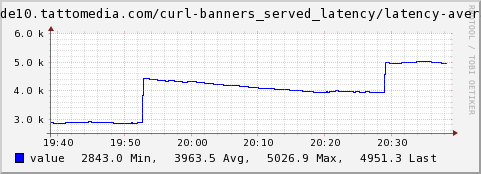
- Example above from Scott M. Likens \<scottatlikens.us>; from usage at Tatto Media.
Dependencies
See also
Configuration examples
This page contains some example configurations for the cURL plugin. This page is meant as a cookbook, so if you have a configuration for an aspect not handled here or a daemon not present, please feel free to add anything that's useful for you.
Average delay of served requests
The following real-world example queries the status page of a custom web-service and fetches the average time it took to handle the last 1000 requests. This is the configuration used to create the example graph on the cURL plugin page.
 <Plugin curl>
   <Page "banners_served_latency">
     <nowiki>URL "http://localhost/status"</nowiki>
     <Match>
       Regex "average speed of last 1,000 banners served: *([0-9]+) *ms"
       DSType "GaugeAverage"
       Type "latency"
        Instance "average"
     </Match>
   </Page>
 </Plugin>
Collecting stats from Thecus NAS N2100
The following real-world example queries status of the NAS Thecus N2100. This Linux-based NAS does not have SNMP module, or lm_sensors modules installed, but stats could be passed via shared files. Here are the steps:
- Install SSH module on N2100
- Login and create cron entry:
*/1 * * * * cat /proc/hwm > /raid/tmp/hwm.txtThis will start dumping stats into a file every minute. - Install NFSD module on N2100
- Create NFS share for /tmp on N2100
- Mount N2100:/raid/tmp to your collectd server mount point (e.g. /mnt/sys/n2100). I mounted it as read only.
Plugin config for system and HDD temperatures, along with fan RPM is below:
 <Plugin curl>
     <Page "N2100">
           <nowiki>URL "file:///mnt/sys/n2100/hwm.txt"</nowiki>
           <Match>
                Regex "Temp 1: ([0-9]+)"
                DSType "GaugeLast"
                Type "temperature"
                Instance "System"
           </Match>
           <Match>
                Regex "Temp 2: ([0-9]+)"
                DSType "GaugeLast"
                Type "temperature"
                Instance "HDD"
           </Match>
           <Match>
                Regex "FAN 1 RPM: ([0-9]+)"
                DSType "GaugeLast"
                Type "fanspeed"
                Instance "Fan-doubleRPM"
          </Match>
     </Page>
 </Plugin>
Note that (at least in my case) the RPMs reported are double of the actual RPMs. Oh well... I was too lazy to write a whole Perl plugin to divide this by 2, hence the name: doubleRPM...
HWM.TXT file:
 File: hwm.txt           Line 1 Col 0       792 bytes
 Address: 5C
 Version: 15
 Temp 1: 43
 Temp 2: 41
 FAN 1 Expected counter(MSB): 00
 FAN 1 Expected counter(LSB): 9E
 FAN 2 Expected counter(MSB): 00
 FAN 2 Expected counter(LSB): 9E
 PWM 1 Raise duty: 30
 PWM 2 Raise duty: 30
 PWM 1 Drop duty: 10
 PWM 2 Drop duty: 10
 PWM 1 duty: 9E
 PWM 2 duty: 9E
 Reset timer control: 50
 FAN 1 in PWM mode(03)
 FAN 2 in PWM mode(03)
 FAN 1 RPM: 9933(0x97,151,0,97)
 FAN 2 RPM: 9933(0x97,151,0,97)
 FAN 1 top RPM: 12396(0x79)
 FAN 2 top RPM: 12396(0x79)
 Reg A0: 32  Reg B0: 32
 -- cut --
References:
1. Thecus N2100 1
2. NFSD module for N2100 2
3. SSH module for N2100 3
See also
Configuration
Configuration options · from collectd.conf(5)
See this section in the full configuration reference
The curl plugin uses the libcurl (http://curl.haxx.se/) to read web pages and the match infrastructure (the same code used by the tail plugin) to use regular expressions with the received data.
The following example will read the current value of AMD stock from Google's finance page and dispatch the value to collectd.
<Plugin curl>
  <Page "stock_quotes">
    Plugin "quotes"
    URL "http://finance.google.com/finance?q=NYSE%3AAMD"
    AddressFamily "any"
    User "foo"
    Password "bar"
    Digest false
    VerifyPeer true
    VerifyHost true
    CACert "/path/to/ca.crt"
    Header "X-Custom-Header: foobar"
    Post "foo=bar"

MeasureResponseTime false
MeasureResponseCode false

    <Match>
      Regex "<span +class=\"pr\"[^>]*> *([0-9]*\\.[0-9]+) *</span>"
      DSType "GaugeAverage"
      # Note: `stock_value' is not a standard type.
      Type "stock_value"
      Instance "AMD"
    </Match>
  </Page>
</Plugin>
In the Plugin block, there may be one or more Page blocks, each defining a web page and one or more "matches" to be performed on the returned data. The string argument to the Page block is used as plugin instance.
The following options are valid within Page blocks:
- Plugin Plugin
- Use Plugin as the plugin name when submitting values. Defaults to
curl. - URL URL
- URL of the web site to retrieve. Since a regular expression will be used to extract information from this data, non-binary data is a big plus here ;)
- AddressFamily Type
- IP version to resolve URL to. Useful in cases when hostname in URL resolves to both IPv4 and IPv6 addresses, and you are interested in using one of them specifically. Use
ipv4to enforce IPv4,ipv6to enforce IPv6, oranyto keep the default behavior of resolving addresses to all IP versions your system allows. Iflibcurlis compiled without IPv6 support, usingipv6will result in a warning and fallback toany. IfTypecannot be parsed, a warning will be printed and the whole Page block will be ignored. - User Name
- Username to use if authorization is required to read the page.
- Password Password
- Password to use if authorization is required to read the page.
- Digest true|false
- Enable HTTP digest authentication.
- VerifyPeer true|false
- Enable or disable peer SSL certificate verification. See http://curl.haxx.se/docs/sslcerts.html for details. Enabled by default.
- VerifyHost true|false
- Enable or disable peer host name verification. If enabled, the plugin checks if the
Common Nameor aSubject Alternate Namefield of the SSL certificate matches the host name provided by the URL option. If this identity check fails, the connection is aborted. Obviously, only works when connecting to a SSL enabled server. Enabled by default. - CACert file
- File that holds one or more SSL certificates. If you want to use HTTPS you will possibly need this option. What CA certificates come bundled with
libcurland are checked by default depends on the distribution you use. - Header Header
- A HTTP header to add to the request. Multiple headers are added if this option is specified more than once.
- Post Body
- Specifies that the HTTP operation should be a POST instead of a GET. The complete data to be posted is given as the argument. This option will usually need to be accompanied by a Header option to set an appropriate
Content-Typefor the post body (e.g. toapplication/x-www-form-urlencoded). - MeasureResponseTime true|false
-
Measure response time for the request. If this setting is enabled, Match blocks (see below) are optional. Disabled by default.
Beware that requests will get aborted if they take too long to complete. Adjust Timeout accordingly if you expect MeasureResponseTime to report such slow requests.
This option is similar to enabling the TotalTime statistic but it's measured by collectd instead of cURL.
- MeasureResponseCode true|false
- Measure response code for the request. If this setting is enabled, Match blocks (see below) are optional. Disabled by default.
- <StatisticsE<gt>
- One Statistics block can be used to specify cURL statistics to be collected for each request to the remote web site. See the section "cURL Statistics" above for details. If this setting is enabled, Match blocks (see below) are optional.
- <MatchE<gt>
- One or more Match blocks that define how to match information in the data returned by
libcurl. Thecurlplugin uses the same infrastructure that's used by thetailplugin, so please see the documentation of thetailplugin below on how matches are defined. If the MeasureResponseTime or MeasureResponseCode options are set to true, Match blocks are optional. - Interval Interval
- Sets the interval (in seconds) in which the values will be collected from this URL. By default the global Interval setting will be used.
- Timeout Milliseconds
-
The Timeout option sets the overall timeout for HTTP requests to URL, in milliseconds. By default, the configured Interval is used to set the timeout. Prior to version 5.5.0, there was no timeout and requests could hang indefinitely. This legacy behaviour can be achieved by setting the value of Timeout to 0.
If Timeout is 0 or bigger than the Interval, keep in mind that each slow network connection will stall one read thread. Adjust the ReadThreads global setting accordingly to prevent this from blocking other plugins.