ipmi plugin
| Plugin name | ipmi |
| Type | read |
| Callbacks | config, init, read, shutdown |
| Status | supported |
| Since | 4.4 |
| Copyright | 2008–2009 Florian octo Forster, 2008 Peter Holik, 2009 Bruno Prémont |
| License | GPLv2 |
| Configuration | collectd.conf(5) |
The IPMI plugin uses the OpenIPMI library to read hardware sensors from servers using the Intelligent Platform Management Interface (IPMI). IPMI is very common with server hardware but usually not available in consumer hardware.
It might be reasonable to start with no specific configuration for sensors and look up the exact names after suitable sensor data has been logged since the strings needed aren't exactly ipmitool sdr names.
Synopsis
 <Plugin "ipmi">
     Sensor "some_sensor"
     Sensor "another_one"
     IgnoreSelected false
     NotifySensorAdd false
     NotifySensorRemove true
     NotifySensorNotPresent false
     SELEnabled false
     SELClearEvent false
 </Plugin>
Parameters
|
|
|
|---|---|---|
|
|
|
|
|
|
|
|
|
|
|
|
|
|
|
|
|
|
|
|
|
|
|
|
Metrics
|
|
|
|
|
|
|
|
|
|
|---|---|---|---|---|---|---|---|---|---|
|
|
|
|
|
|
|
|
|
|
|
|
|
|
|
|
|
|
|
|
|
|
|
|
|
|
|
|
|
|
|
|
|
|
|
|
|
|
|
|
|
|
|
|
|
|
|
|
|
|
|
|
|
|
|
|
|
|
|
|
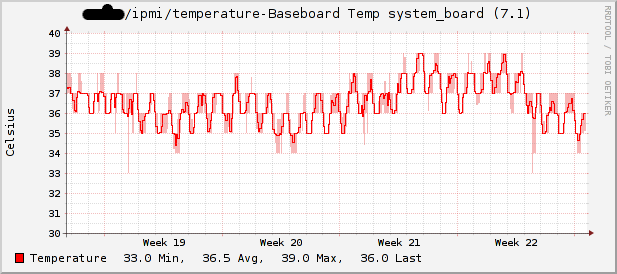
Example graphs
Dependencies
See Also
Configuration
Configuration options · from collectd.conf(5)
See this section in the full configuration reference
The ipmi plugin allows to monitor server platform status using the Intelligent Platform Management Interface (IPMI). Local and remote interfaces are supported.
The plugin configuration consists of one or more Instance blocks which specify one ipmi connection each. Each block requires one unique string argument as the instance name. If instances are not configured, an instance with the default option values will be created.
For backwards compatibility, any option other than Instance block will trigger legacy config handling and it will be treated as an option within Instance block. This support will go away in the next major version of Collectd.
Within the Instance blocks, the following options are allowed:
- Address Address
- Hostname or IP to connect to. If not specified, plugin will try to connect to local management controller (BMC).
- Username Username
- Password Password
- The username and the password to use for the connection to remote BMC.
- AuthType MD5|rmcp+
- Forces the authentication type to use for the connection to remote BMC. By default most secure type is seleted.
- Host Hostname
- Sets the host field of dispatched values. Defaults to the global hostname setting.
- Sensor Sensor
-
Selects sensors to collect or to ignore, depending on IgnoreSelected.
See
/"IGNORELISTS"for details. - IgnoreSelected true|false
- If no configuration if given, the ipmi plugin will collect data from all sensors found of type "temperature", "voltage", "current" and "fanspeed". This option enables you to do that: By setting IgnoreSelected to true the effect of Sensor is inverted: All selected sensors are ignored and all other sensors are collected.
- NotifySensorAdd true|false
- If a sensor appears after initialization time of a minute a notification is sent.
- NotifySensorRemove true|false
- If a sensor disappears a notification is sent.
- NotifySensorNotPresent true|false
- If you have for example dual power supply and one of them is (un)plugged then a notification is sent.
- NotifyIPMIConnectionState true|false
- If a IPMI connection state changes after initialization time of a minute a notification is sent. Defaults to false.
- SELEnabled true|false
- If system event log (SEL) is enabled, plugin will listen for sensor threshold and discrete events. When event is received the notification is sent. SEL event filtering can be configured using SELSensor and SELIgnoreSelected config options. Defaults to false.
- SELSensor SELSensor
-
Selects sensors to get events from or to ignore, depending on SELIgnoreSelected.
See
/"IGNORELISTS"for details. - SELIgnoreSelected true|false
- If no configuration is given, the ipmi plugin will pass events from all sensors. This option enables you to do that: By setting SELIgnoreSelected to true the effect of SELSensor is inverted: All events from selected sensors are ignored and all events from other sensors are passed.
- SELClearEvent true|false
- If SEL clear event is enabled, plugin will delete event from SEL list after it is received and successfully handled. In this case other tools that are subscribed for SEL events will receive an empty event. Defaults to false.