memcached plugin
| Plugin name | memcached |
| Type | read |
| Callbacks | config, read |
| Status | supported |
| Since | 4.2 |
| Copyright | 2007 Antony Dovgal, 2007–2009 Florian octo Forster, 2009 Doug MacEachern |
| Configuration | collectd.conf(5) |
The memcached plugin connects to a memcached daemon and collects the number of connections and requests handled by the daemon, the CPU resources consumed, number of items cached, number of threads, and bytes sent and received.
Synopsis
Example graph
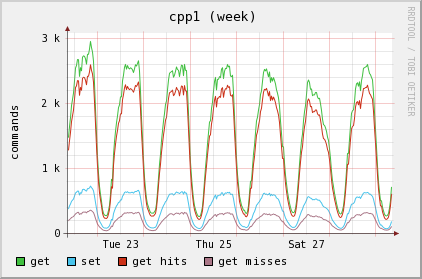
The following example graph shows the number of requests to a memcached daemon. You can see the set requests and the get requests, split up into cache hits and misses, too.
Dependencies
- none
See also
Configuration
Configuration options · from collectd.conf(5)
See this section in the full configuration reference
The memcached plugin connects to a memcached server and queries statistics about cache utilization, memory and bandwidth used. http://memcached.org/
<Plugin "memcached">
  <Instance "name">
    #Host "memcache.example.com"
    Address "127.0.0.1"
    Port 11211
  </Instance>
</Plugin>
The plugin configuration consists of one or more Instance blocks which specify one memcached connection each. Within the Instance blocks, the following options are allowed:
- Host Hostname
- Sets the host field of dispatched values. Defaults to the global hostname setting. For backwards compatibility, values are also dispatched with the global hostname when Host is set to 127.0.0.1 or localhost and Address is not set.
- Address Address
- Hostname or IP to connect to. For backwards compatibility, defaults to the value of Host or 127.0.0.1 if Host is unset.
- Port Port
- TCP port to connect to. Defaults to 11211.
- Socket Path
- Connect to memcached using the UNIX domain socket at Path. If this setting is given, the Address and Port settings are ignored.