sensors plugin
| Plugin name | sensors |
| Type | read |
| Callbacks | config, read, shutdown |
| Status | supported |
| Since | 1.4 |
| Copyright | 2005–2008 Florian octo Forster, 2006 Luboš Staněk |
| License | GPLv2 |
| Configuration | collectd.conf(5) |
The Sensors plugin uses lm-sensors to read hardware sensors. You will need to configure lm-sensors (run sensors-detect as root) before this plugin will collect any useful and correct data. Try the sensors(1) application: If it works, so should this plugin.
Since often not all sensors that can be collected are actually useful (I never need the voltage sensors, for example), you can chose to only select some of the sensors.
Synopsis
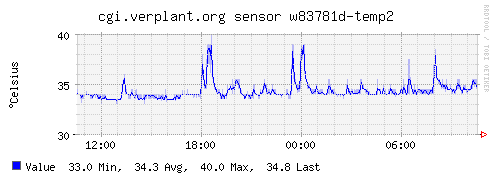
Example graph
Dependencies
Configuration
Configuration options · from collectd.conf(5)
See this section in the full configuration reference
The Sensors plugin uses lm_sensors to retrieve sensor-values. This means that all the needed modules have to be loaded and lm_sensors has to be configured (most likely by editing /etc/sensors.conf. Read sensors.conf(5) for details.
The lm_sensors homepage can be found at http://secure.netroedge.com/~lm78/.
- SensorConfigFile File
- Read the lm_sensors configuration from File. When unset (recommended), the library's default will be used.
- Sensor chip-bus-address/type-feature
-
Selects the name of the sensor which you want to collect or ignore, depending on the IgnoreSelected below. For example, the option "Sensor it8712-isa-0290/voltage-in1" will cause collectd to gather data for the voltage sensor in1 of the it8712 on the isa bus at the address 0290.
The value passed to this option has the format "plugin_instance/type-type_instance".
See
/"IGNORELISTS"for details. - IgnoreSelected true|false
- If no configuration if given, the sensors-plugin will collect data from all sensors. This may not be practical, especially for uninteresting sensors. Thus, you can use the Sensor-option to pick the sensors you're interested in. Sometimes, however, it's easier/preferred to collect all sensors except a few ones. This option enables you to do that: By setting IgnoreSelected to true the effect of Sensor is inverted: All selected sensors are ignored and all other sensors are collected.
- UseLabels true|false
- Configures how sensor readings are reported. When set to true, sensor readings are reported using their descriptive label (e.g. "VCore"). When set to false (the default) the sensor name is used ("in0").