dbi plugin
| Plugin name | dbi |
| Type | read |
| Callbacks | config, init, read, shutdown |
| Status | supported |
| Since | 4.6 |
| Copyright | 2008–2015 Florian Forster |
| License | MIT License |
| Configuration | collectd.conf(5) |
The DBI plugin uses libdbi, a database abstraction library, to execute SQL statements on a database and read back the result. Depending on the configuration, the returned values are then converted into collectd "value-lists" (the data structure used internally to pass statistics around). This plugin is a generic plugin, i.e. it cannot work without configuration, because there is no reasonable default behavior. Please read the Plugin dbi section of the collectd.conf(5) manual page for an in-depth description of the plugin's configuration.
Being an abstraction layer, libdbi can connect to and talk with a variety of database systems. Database specific code is encapsulated in "database drivers" (DBD), which are developed as the separate libdbi-drivers project. Currently, drivers for the following databases are available:
- Firebird / Interbase
- FreeTDS (provides access to MS SQL Server and Sybase)
- MariaDB
- MySQL
- PostgreSQL
- SQLite / SQLite3
The configuration syntax of the DBI, Oracle, and PostgreSQL plugins is very similar, because the configuration of those plugins is handled by the same module. Also, we tried to keep the syntax similar to that of the SNMP plugin. So if you use any of those plugins already, most of the following will look familiar.
Synopsis
 <Plugin dbi>
   <Query "out_of_stock">
     Statement "SELECT category, COUNT(*) AS value FROM products WHERE in_stock = 0 GROUP BY category"
     # Use with MySQL 5.0.0 or later
     MinVersion 50000
     <Result>
       Type "gauge"
       InstancePrefix "out_of_stock"
       InstancesFrom "category"
       ValuesFrom "value"
     </Result>
   </Query>
   <Database "product_information">
     Driver "mysql"
     DriverOption "host" "localhost"
     # You may connect via socket as well:
     # DriverOption "mysql_unix_socket" "/var/tmp/mysql.sock"
     DriverOption "username" "collectd"
     DriverOption "password" "aZo6daiw"
     DriverOption "dbname" "prod_info"
     SelectDB "prod_info"
     Query "out_of_stock"
   </Database>
 </Plugin>
  LoadPlugin dbi
  <Plugin dbi>
    ## Query sections must be before Database sections
    <Query "global_status">
      Statement "SHOW GLOBAL STATUS WHERE Value REGEXP '^-?[.0-9]+$';"
      <Result>
        Type "gauge"
        InstancesFrom "Variable_name"
        ValuesFrom "Value"
      </Result>
    </Query>
    <Database "mariadb_global_status">
      Driver "mysql"
      DriverOption "host" "127.0.0.1"
      DriverOption "username" "collectd"
      DriverOption "password" "collectd"
      DriverOption "dbname" "information_schema"
      Query "global_status"
    </Database>
  </Plugin>
Example graphs
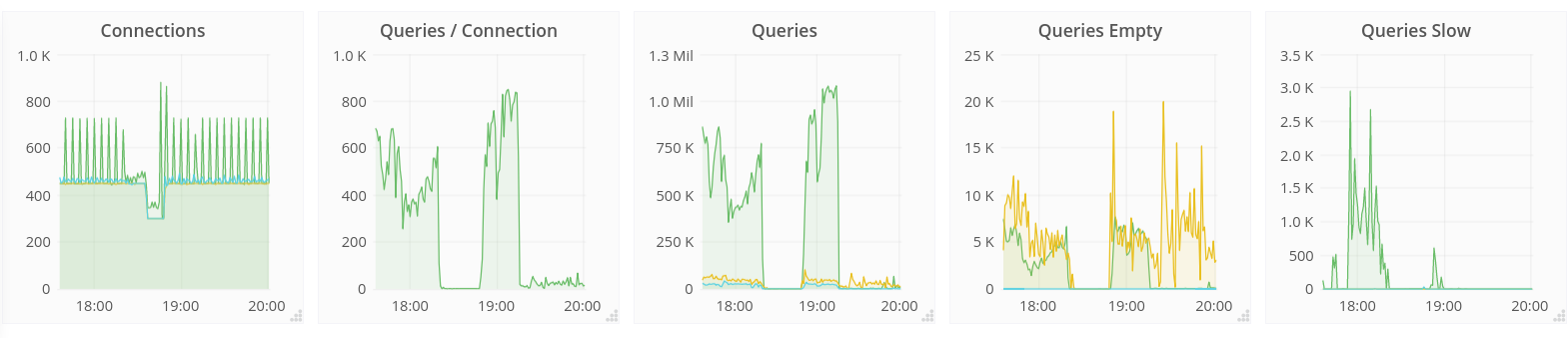
Dependencies
See also
- Oracle plugin
- PostgreSQL plugin
Configuration
Configuration options · from collectd.conf(5)
See this section in the full configuration reference
This plugin uses the dbi library (http://libdbi.sourceforge.net/) to connect to various databases, execute SQL statements and read back the results. dbi is an acronym for "database interface" in case you were wondering about the name. You can configure how each column is to be interpreted and the plugin will generate one or more data sets from each row returned according to these rules.
Because the plugin is very generic, the configuration is a little more complex than those of other plugins. It usually looks something like this:
<Plugin dbi>
  <Query "out_of_stock">
    Statement "SELECT category, COUNT(*) AS value FROM products WHERE in_stock = 0 GROUP BY category"
    # Use with MySQL 5.0.0 or later
    MinVersion 50000
    <Result>
      Type "gauge"
      InstancePrefix "out_of_stock"
      InstancesFrom "category"
      ValuesFrom "value"
    </Result>
  </Query>
  <Database "product_information">
    #Plugin "warehouse"
    Driver "mysql"
    Interval 120
    DriverOption "host" "localhost"
    DriverOption "username" "collectd"
    DriverOption "password" "aZo6daiw"
    DriverOption "dbname" "prod_info"
    SelectDB "prod_info"
    Query "out_of_stock"
  </Database>
</Plugin>
The configuration above defines one query with one result and one database. The query is then linked to the database with the Query option within the <DatabaseE<gt> block. You can have any number of queries and databases and you can also use the Include statement to split up the configuration file in multiple, smaller files. However, the <QueryE<gt> block must precede the <DatabaseE<gt> blocks, because the file is interpreted from top to bottom!
The following is a complete list of options:
Query blocks
Query blocks define SQL statements and how the returned data should be interpreted. They are identified by the name that is given in the opening line of the block. Thus the name needs to be unique. Other than that, the name is not used in collectd.
In each Query block, there is one or more Result blocks. Result blocks define which column holds which value or instance information. You can use multiple Result blocks to create multiple values from one returned row. This is especially useful, when queries take a long time and sending almost the same query again and again is not desirable.
Example:
<Query "environment">
  Statement "select station, temperature, humidity from environment"
  <Result>
    Type "temperature"
    # InstancePrefix "foo"
    InstancesFrom "station"
    ValuesFrom "temperature"
  </Result>
  <Result>
    Type "humidity"
    InstancesFrom "station"
    ValuesFrom "humidity"
  </Result>
</Query>
The following options are accepted:
- Statement SQL
-
Sets the statement that should be executed on the server. This is not interpreted by collectd, but simply passed to the database server. Therefore, the SQL dialect that's used depends on the server collectd is connected to.
The query has to return at least two columns, one for the instance and one value. You cannot omit the instance, even if the statement is guaranteed to always return exactly one line. In that case, you can usually specify something like this:
(That works with MySQL but may not be valid SQL according to the spec. If you use a more strict database server, you may have to select from a dummy table or something.)
Please note that some databases, for example Oracle, will fail if you include a semicolon at the end of the statement.
- MinVersion Version
- MaxVersion Value
-
Only use this query for the specified database version. You can use these options to provide multiple queries with the same name but with a slightly different syntax. The plugin will use only those queries, where the specified minimum and maximum versions fit the version of the database in use.
The database version is determined by
dbi_conn_get_engine_version, see the libdbi documentation for details. Basically, each part of the version is assumed to be in the range from 00 to 99 and all dots are removed. So version "4.1.2" becomes "40102", version "5.0.42" becomes "50042".Warning: The plugin will use all matching queries, so if you specify multiple queries with the same name and overlapping ranges, weird stuff will happen. Don't to it! A valid example would be something along these lines:
MinVersion 40000
MaxVersion 49999
...
MinVersion 50000
MaxVersion 50099
...
MinVersion 50100
# No maximum
In the above example, there are three ranges that don't overlap. The last one goes from version "5.1.0" to infinity, meaning "all later versions". Versions before "4.0.0" are not specified.
- Type Type
-
The type that's used for each line returned. See types.db(5) for more details on how types are defined. In short: A type is a predefined layout of data and the number of values and type of values has to match the type definition.
If you specify "temperature" here, you need exactly one gauge column. If you specify "if_octets", you will need two counter columns. See the ValuesFrom setting below.
There must be exactly one Type option inside each Result block.
- InstancePrefix prefix
- Prepends prefix to the type instance. If InstancesFrom (see below) is not given, the string is simply copied. If InstancesFrom is given, prefix and all strings returned in the appropriate columns are concatenated together, separated by dashes ("-").
- InstancesFrom column0 [column1 ...]
-
Specifies the columns whose values will be used to create the "type-instance" for each row. If you specify more than one column, the value of all columns will be joined together with dashes ("-") as separation characters.
The plugin itself does not check whether or not all built instances are different. It's your responsibility to assure that each is unique. This is especially true, if you do not specify InstancesFrom: You have to make sure that only one row is returned in this case.
If neither InstancePrefix nor InstancesFrom is given, the type-instance will be empty.
- ValuesFrom column0 [column1 ...]
-
Names the columns whose content is used as the actual data for the data sets that are dispatched to the daemon. How many such columns you need is determined by the Type setting above. If you specify too many or not enough columns, the plugin will complain about that and no data will be submitted to the daemon.
The actual data type in the columns is not that important. The plugin will automatically cast the values to the right type if it know how to do that. So it should be able to handle integer an floating point types, as well as strings (if they include a number at the beginning).
There must be at least one ValuesFrom option inside each Result block.
- MetadataFrom [column0 column1 ...]
-
Names the columns whose content is used as metadata for the data sets that are dispatched to the daemon.
The actual data type in the columns is not that important. The plugin will automatically cast the values to the right type if it know how to do that. So it should be able to handle integer an floating point types, as well as strings (if they include a number at the beginning).
Database blocks
Database blocks define a connection to a database and which queries should be sent to that database. Since the used "dbi" library can handle a wide variety of databases, the configuration is very generic. If in doubt, refer to libdbi's documentationE<nbsp>- we stick as close to the terminology used there.
Each database needs a "name" as string argument in the starting tag of the block. This name will be used as "PluginInstance" in the values submitted to the daemon. Other than that, that name is not used.
- Plugin Plugin
- Use Plugin as the plugin name when submitting query results from this Database. Defaults to
dbi. - Interval Interval
- Sets the interval (in seconds) in which the values will be collected from this database. By default the global Interval setting will be used.
- Driver Driver
-
Specifies the driver to use to connect to the database. In many cases those drivers are named after the database they can connect to, but this is not a technical necessity. These drivers are sometimes referred to as "DBD", DataB<B>ase Driver, and some distributions ship them in separate packages. Drivers for the "dbi" library are developed by the libdbi-drivers project at http://libdbi-drivers.sourceforge.net/.
You need to give the driver name as expected by the "dbi" library here. You should be able to find that in the documentation for each driver. If you mistype the driver name, the plugin will dump a list of all known driver names to the log.
- DriverOption Key Value
-
Sets driver-specific options. What option a driver supports can be found in the documentation for each driver, somewhere at http://libdbi-drivers.sourceforge.net/. However, the options "host", "username", "password", and "dbname" seem to be deE<nbsp>facto standards.
DBDs can register two types of options: String options and numeric options. The plugin will use the
dbi_conn_set_optionfunction when the configuration provides a string and thedbi_conn_require_option_numericfunction when the configuration provides a number. So these two lines will actually result in different calls being used:Unfortunately, drivers are not too keen to report errors when an unknown option is passed to them, so invalid settings here may go unnoticed. This is not the plugin's fault, it will report errors if it gets them from the libraryE<nbsp>/ the driver. If a driver complains about an option, the plugin will dump a complete list of all options understood by that driver to the log. There is no way to programmatically find out if an option expects a string or a numeric argument, so you will have to refer to the appropriate DBD's documentation to find this out. Sorry.
- SelectDB Database
- In some cases, the database name you connect with is not the database name you want to use for querying data. If this option is set, the plugin will "select" (switch to) that database after the connection is established.
- Query QueryName
- Associates the query named QueryName with this database connection. The query needs to be defined before this statement, i. e. all query blocks you want to refer to must be placed above the database block you want to refer to them from.
- Host Hostname
- Sets the host field of value lists to Hostname when dispatching values. Defaults to the global hostname setting.