snmp plugin
| Plugin name | snmp |
| Type | read |
| Callbacks | config, init, read, shutdown |
| Status | supported |
| Since | 4.1 |
| Copyright | 2007–2012 Florian Forster |
| License | MIT License |
| Configuration | collectd.conf(5) |
Description
The SNMP plugin uses the Net-SNMP library to read values from network devices using the Simple Network Management Protocol (SNMP). SNMP is a widespread standard to provide management data from devices such as switches, routers, rack monitoring systems, uninterruptible power supplies (UPS), etc. While theoretically possible, collecting values from other computers via this protocol is discouraged in favor of collectd's own protocol, implemented by the Network plugin.
This plugin is a generic plugin, i.e. it cannot work without configuration, because there is no reasonable default behavior. Please read the Plugin snmp section of the collectd.conf(5) manual page for an in-depth description of the plugin's configuration. The majority of documentation for this plugin has been moved to the collectd-snmp(5) manual page.
Some data definitions for the SNMP plugin can be found in the contrib/snmp-data.conf file in the source tarball. If you have additions to this file, feel free to send them to the mailing-list.
Synopsis
- → See: Plugin-SNMP-Config
 LoadPlugin snmp
 # ...
 <Plugin snmp>
   <Data "powerplus_voltge_input">
     Type "voltage"
     Table false
     Instance "input_line1"
     Scale 0.1
     Values "SNMPv2-SMI::enterprises.6050.5.4.1.1.2.1"
   </Data>
   <Data "hr_users">
     Type "users"
     Table false
     Instance ""
     Shift -1
     Values "HOST-RESOURCES-MIB::hrSystemNumUsers.0"
   </Data>
   <Data "std_traffic">
     Type "if_octets"
     Table true
     Instance "IF-MIB::ifDescr"
     Values "IF-MIB::ifInOctets" "IF-MIB::ifOutOctets"
   </Data>

   <Host "some.switch.mydomain.org">
     Address "192.168.0.2"
     Version 1
     Community "community_string"
     Collect "std_traffic"
     Interval 120
   </Host>
   <Host "some.server.mydomain.org">
     Address "192.168.0.42"
     Version 2
     Community "another_string"
     Collect "std_traffic" "hr_users"
   </Host>
   <Host "some.ups.mydomain.org">
     Address "192.168.0.3"
     Version 1
     Community "more_communities"
     Collect "powerplus_voltge_input"
     Interval 300
   </Host>
 </Plugin>
Example graphs
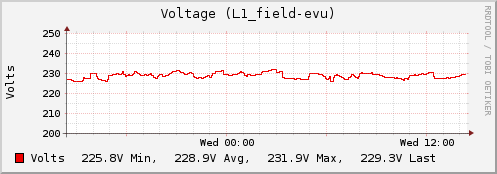
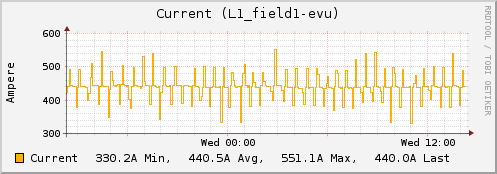
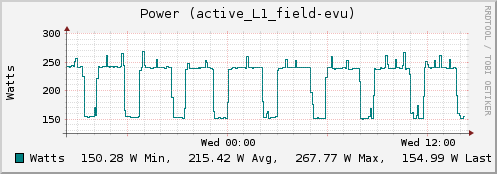
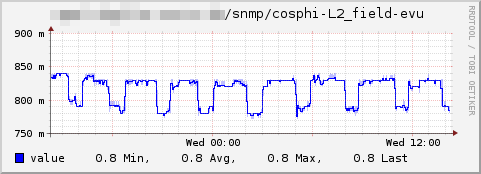
Data center power supply
The following graphs are from a device monitoring a data center's power supply. The graphs show voltage, current, power and (\cos(\phi)) for a main line or fuse.
Caveats
Unique instance names
You should be careful with the OID you use for the Instance parameter: For example IF-MIB::ifDescr is often not sufficiently unique, using IF-MIB::ifName may be better. In some of the provided examples this will bite you with certain devices (for example switches by Cisco).
Another problem may arise from instance names being too long. Currently there is a 63 character limit on instance names, see Naming-schema. If two strings only differ after the 63rd character, the resulting name will not be unique.
Maximum number of hosts
While collectd and the SNMP plugin don't have any limitation on the number of hosts you can configure, the library used by the SNMP plugin, libnetsnmp, uses the select(2) system call. This system call uses a fixed-size bitfield to hold file descriptors. On many systems this limits the number of hosts you can query with the SNMP plugin to 1024 (for example when using the GNU libc).
To solve this issue, the netsnmp library must be changed. A solution would be to switch to the poll(2) system call which doesn't have a static limit on the largest file descriptor it can handle.
Dependencies
See also
Configuration examples
This page contains some example configurations for the SNMP plugin. This page is meant as a cookbook, so if you have a configuration for an aspect not handled here or a daemon not present, please feel free to add anything that's useful for you.
These definitions are also available in the source code distribution as contrib/snmp-data.conf.
Interfaces (IF-MIB)
Interface statistics using the IF-MIB, as described in RFC 2863. Versions for 32bit counters (ifTable table) and 64bit counters (ifXTable) are present.
32bit counters
These configurations use ifDescr from ifTable as type instance.
 <Data "ifmib_if_octets32">
   Type "if_octets"
   Table true
   Instance "IF-MIB::ifDescr"
   Values "IF-MIB::ifInOctets" "IF-MIB::ifOutOctets"
 </Data>
 <Data "ifmib_if_packets32">
   Type "if_packets"
   Table true
   Instance "IF-MIB::ifDescr"
   Values "IF-MIB::ifInUcastPkts" "IF-MIB::ifOutUcastPkts"
 </Data>
 <Data "ifmib_if_errors32">
   Type "if_errors"
   Table true
   Instance "IF-MIB::ifDescr"
   Values "IF-MIB::ifInErrors" "IF-MIB::ifOutErrors"
 </Data>
64bit counters
These configurations use ifName from ifXTable as type instance.
 <Data "ifmib_if_octets64">
   Type "if_octets"
   Table true
   Instance "IF-MIB::ifName"
   Values "IF-MIB::ifHCInOctets" "IF-MIB::ifHCOutOctets"
 </Data>
 <Data "ifmib_if_packets64">
   Type "if_packets"
   Table true
   Instance "IF-MIB::ifName"
   Values "IF-MIB::ifHCInUcastPkts" "IF-MIB::ifHCOutUcastPkts"
 </Data>
 <Data "ifmib_if_errors64">
   Type "if_errors"
   Table true
   Instance "IF-MIB::ifName"
   Values "IF-MIB::ifHCInErrors" "IF-MIB::ifHCOutErrors"
 </Data>
Uninterruptible power supplies (UPS-MIB)
The following definitions query information about Uninterruptible power supplies (UPSes). The information is described in the UPS-MIB from RFC 1628.
Battery
 <Data "upsmib_timeleft_battery">
   Type "timeleft"
   Table false
   Instance "battery"
   Values ".1.3.6.1.2.1.33.1.2.3.0"
 </Data>
 <Data "upsmib_charge_battery">
   Type "percent"
   Table false
   Instance "charge-battery"
   Values ".1.3.6.1.2.1.33.1.2.4.0"
 </Data>
 <Data "upsmib_voltage_battery">
   Type "voltage"
   Table false
   Instance "battery"
   Values ".1.3.6.1.2.1.33.1.2.5.0"
   Scale 0.1
 </Data>
 <Data "upsmib_current_battery">
   Type "current"
   Table false
   Instance "battery"
   Values ".1.3.6.1.2.1.33.1.2.6.0"
   Scale 0.1
 </Data>
 <Data "upsmib_temperature_battery">
   Type "temperature"
   Table false
   Instance "battery"
   Values ".1.3.6.1.2.1.33.1.2.7.0"
 </Data>
Input
 <Data "upsmib_frequency_input">
   Type "frequency"
   Table true
   InstancePrefix "input"
   Values ".1.3.6.1.2.1.33.1.3.3.1.2"
   Scale 0.1
 </Data>
 <Data "upsmib_voltage_input">
   Type "voltage"
   Table true
   InstancePrefix "input"
   Values ".1.3.6.1.2.1.33.1.3.3.1.3"
 </Data>
 <Data "upsmib_current_input">
   Type "current"
   Table true
   InstancePrefix "input"
   Values ".1.3.6.1.2.1.33.1.3.3.1.4"
   Scale 0.1
 </Data>
 <Data "upsmib_power_input">
   Type "power"
   Table true
   InstancePrefix "input"
   Values ".1.3.6.1.2.1.33.1.3.3.1.5"
 </Data>
Output
 <Data "upsmib_frequency_output">
   Type "frequency"
   Table false
   Instance "output"
   Values ".1.3.6.1.2.1.33.1.4.2.0"
   Scale 0.1
 </Data>
 <Data "upsmib_voltage_output">
   Type "voltage"
   Table true
   InstancePrefix "output"
   Values ".1.3.6.1.2.1.33.1.4.4.1.2"
 </Data>
 <Data "upsmib_current_output">
   Type "current"
   Table true
   InstancePrefix "output"
   Values ".1.3.6.1.2.1.33.1.4.4.1.3"
   Scale 0.1
 </Data>
 <Data "upsmib_power_output">
   Type "power"
   Table true
   InstancePrefix "output"
   Values ".1.3.6.1.2.1.33.1.4.4.1.4"
 </Data>
 <Data "upsmib_load_output">
   Type "percent"
   Table true
   InstancePrefix "load-output"
   Values ".1.3.6.1.2.1.33.1.4.4.1.5"
 </Data>
Bypass
 <Data "upsmib_frequency_bypass">
   Type "frequency"
   Table false
   Instance "output"
   Values ".1.3.6.1.2.1.33.1.5.1.0"
   Scale 0.1
 </Data>
 <Data "upsmib_voltage_bypass">
   Type "voltage"
   Table true
   InstancePrefix "bypass"
   Values ".1.3.6.1.2.1.33.1.5.3.1.2"
 </Data>
 <Data "upsmib_current_bypass">
   Type "current"
   Table true
   InstancePrefix "bypass"
   Values ".1.3.6.1.2.1.33.1.5.3.1.3"
   Scale 0.1
 </Data>
 <Data "upsmib_power_bypass">
   Type "power"
   Table true
   InstancePrefix "bypass"
   Values ".1.3.6.1.2.1.33.1.5.3.1.4"
 </Data>
Work-arounds
Unfortunately not all vendors interpret the UPS-MIB correctly. The following are special definitions for handling common mistakes in broken UPSes.
 <Data "upsmib_voltage_battery_unscaled">
   Type "voltage"
   Table false
   Instance "battery"
   Values ".1.3.6.1.2.1.33.1.2.5.0"
 </Data>
 <Data "upsmib_current_input_unscaled">
   Type "current"
   Table true
   InstancePrefix "input"
   Values ".1.3.6.1.2.1.33.1.3.3.1.4"
 </Data>
 <Data "upsmib_current_output_unscaled">
   Type "current"
   Table true
   InstancePrefix "output"
   Values ".1.3.6.1.2.1.33.1.4.4.1.3"
 </Data>
NetApp
- → See: NetApp plugin
Information about storage systems by NetApp, Inc..
 <Data "netapp_cpu_system">
   Type "cpu"
   Table false
   Instance "system"
   Values ".1.3.6.1.4.1.789.1.2.1.2.0"
 </Data>
 <Data "netapp_cpu_idle">
   Type "cpu"
   Table false
   Instance "idle"
   Values ".1.3.6.1.4.1.789.1.2.1.4.0"
 </Data>
 <Data "netapp_if_octets">
   Type "if_octets"
   Table false
   Instance "net"
   Values ".1.3.6.1.4.1.789.1.2.2.12.0" ".1.3.6.1.4.1.789.1.2.2.14.0"
 </Data>
MikroTik RouterOS
- → See: RouterOS plugin
Information about devices running RouterOS by MikroTik.
 <Data "mikrotik_wl_sta_bitrate_tx">
   tYPE "Bitrate"
   Table true
   InstancePrefix "st-tx-"
   Instance ".1.3.6.1.4.1.14988.1.1.1.1.1.5"
   Values ".1.3.6.1.4.1.14988.1.1.1.1.1.2"
 </Data>

 <Data "mikrotik_wl_sta_bitrate_rx">
   Type "bitrate"
   Table true
   InstancePrefix "st-rx-"
   Instance ".1.3.6.1.4.1.14988.1.1.1.1.1.5"
   Values ".1.3.6.1.4.1.14988.1.1.1.1.1.3"
 </Data>

 <Data "mikrotik_wl_sta_signal">
   Type "signal_power"
   Table true
   InstancePrefix "st-"
   Instance ".1.3.6.1.4.1.14988.1.1.1.1.1.5"
   Values ".1.3.6.1.4.1.14988.1.1.1.1.1.4"
 </Data>

 # Wireless statistics: AP mode / registration table
 <Data "mikrotik_wl_reg_signal">
   Type "signal_power"
   Table true
   InstancePrefix "ap-"
   Instance ".1.3.6.1.4.1.14988.1.1.1.2.1.1"
   Values ".1.3.6.1.4.1.14988.1.1.1.2.1.3"
 </Data>

 <Data "mikrotik_wl_sta_bitrate_tx">
   tYPE "Bitrate"
   Table true
   InstancePrefix "st-tx-"
   Instance ".1.3.6.1.4.1.14988.1.1.1.1.1.5"
   Values ".1.3.6.1.4.1.14988.1.1.1.1.1.2"
 </Data>

 <Data "mikrotik_wl_sta_bitrate_rx">
   Type "bitrate"
   Table true
   InstancePrefix "st-rx-"
   Instance ".1.3.6.1.4.1.14988.1.1.1.1.1.5"
   Values ".1.3.6.1.4.1.14988.1.1.1.1.1.3"
 </Data>

 <Data "mikrotik_wl_sta_signal">
   Type "signal_power"
   Table true
   InstancePrefix "st-"
   Instance ".1.3.6.1.4.1.14988.1.1.1.1.1.5"
   Values ".1.3.6.1.4.1.14988.1.1.1.1.1.4"
 </Data>

 # Wireless statistics: AP mode / registration table
 <Data "mikrotik_wl_reg_signal">
   Type "signal_power"
   Table true
   InstancePrefix "ap-"
   Instance ".1.3.6.1.4.1.14988.1.1.1.2.1.1"
   Values ".1.3.6.1.4.1.14988.1.1.1.2.1.3"
 </Data>
See also
Configuration
Configuration options · from collectd.conf(5)
See this section in the full configuration reference
Since the configuration of the snmp plugin is a little more complicated than other plugins, its documentation has been moved to an own manpage, collectd-snmp(5). Please see there for details.