netapp plugin
| Plugin name | netapp |
| Type | read |
| Callbacks | config, init, read, shutdown |
| Status | supported |
| Since | 4.9 |
| Copyright | 2009 Sven Trenkel |
| License | MIT License |
| Configuration | collectd.conf(5) |
The NetApp plugin is a read plugin that connects to a NetApp storage system and queries various performance values from the system. Queried values include used / free disk space, read and write operations, network IO, and CPU utilization.
The plugin uses libnetapp, a library provided by NetApp, Inc., to connect to one or more filers and receive information. This way information is available that isn't provided via SNMP, for example snapshot statistics. Due to a wide variety of available statistics, it is possible to control very fine-grained which information to collect using the configuration. Each group of statistics can be collected in a separate interval, so that free / used disk space can be collected less often than, say, CPU utilization.
The plugin was written in 2009 by Sven Trenkel for the noris network AG and licensed under the MIT license.
This plugin is a generic plugin, i.e. it cannot work without configuration, because there is no reasonable default behavior. Please read the Plugin netapp section of the collectd.conf(5) manual page for an in-depth description of the plugin's configuration.
Synopsis
 <Plugin "netapp">
   <Host "netapp1.example.com">
    Protocol      "https"
    Address       "10.0.0.1"
    Port          443
    User          "username"
    Password      "aef4Aebe"
    Interval      30

    <WAFL>
      Interval 30
      GetNameCache   true
      GetDirCache    true
      GetBufferCache true
      GetInodeCache  true
    </WAFL>

    <Disks>
      Interval 30
      GetBusy true
    </Disks>

    <VolumePerf>
      GetIO      "volume0"
      IgnoreSelectedIO      false
      GetOps     "volume0"
      IgnoreSelectedOps     false
      GetLatency "volume0"
      IgnoreSelectedLatency false
    </VolumePerf>

    <VolumeUsage>
      GetCapacity "vol0"
      GetCapacity "vol1"
      IgnoreSelectedCapacity false
      GetSnapshot "vol1"
      GetSnapshot "vol3"
      IgnoreSelectedSnapshot false
    </VolumeUsage>

    <System>
      Interval 30
      GetCPULoad     true
      GetInterfaces  true
      GetDiskOps     true
      GetDiskIO      true
    </System>
   </Host>
 </Plugin>
Example graphs
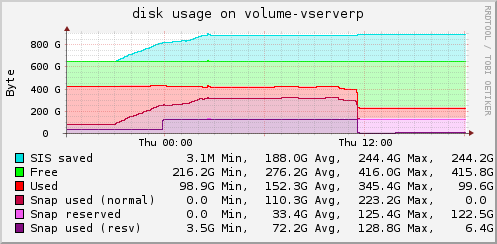 Used and free space in a volume. You can also see the amount of additional space available thanks to Single Instance Storage (SIS) by finding duplicate blocks. SIS began its very first run on this volume around 21:00 but all freed space was still in use by older snapshots. At around 0:00 the space reserved for snapshots was increased, at 11:30 these snapshots were deleted, causing “normal” space to be freed while some space remains reserved for snapshots.
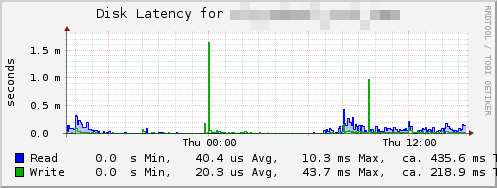 Average time per operation on a specific volume.
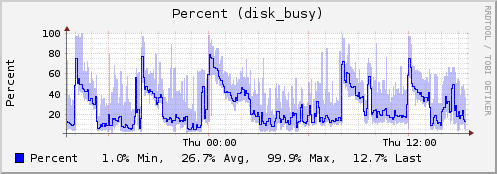 Usage (in percent) of the busiest disk in the system. This disk is usually the bottleneck and an indicator of the overall performance.
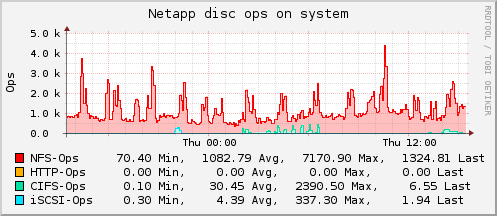 System-wide operations by access type.
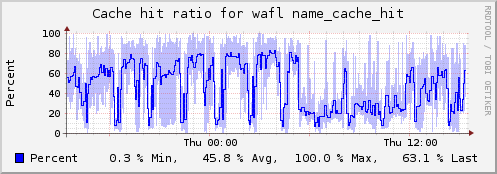 Hit ratio of the name cache.
Dependencies
- libnetapp, a library that is part of the Manage ONTAP SDK published by NetApp.
Netapp Configuration Required
This is an example configuration that has to be done on the filer before collectd can start collecting data via the API. A user with API access needs to be created, as stated above, but SSL also needs to be setup and enabled.
 zeus*> options httpd.admin
 httpd.admin.access           legacy
 httpd.admin.enable           on
 httpd.admin.hostsequiv.enable on
 httpd.admin.max_connections  512
 httpd.admin.ssl.enable       off
 httpd.admin.top-page.authentication on
 zeus*> options httpd.admin.ssl.enable on
 SSL is not configured. Please use the command
 'secureadmin setup ssl' to configure SSL.
 zeus*> secureadmin setup ssl
 Country Name (2 letter code) [US]:
 State or Province Name (full name) [California]:
 Locality Name (city, town, etc.) [Santa Clara]: Union City
 Organization Name (company) [Your Company]: Filer Jedi
 Organization Unit Name (division):  TechOps
 Common Name (fully qualified domain name) [zeus.filerjedi.com]:
 Administrator email:  somedude@filerjedi.com
 Days until expires [5475] :
 Key length (bits) [512] :
 Thu May 20 08:55:23 PDT [zeus: secureadmin.ssl.setup.success:info]: Starting SSL with new certificate.
 zeus*> options httpd.admin.ssl.enable on
 zeus*>
See also
- NetApp, Inc.
- Download and documentation for libnetapp (NetApp community account required)
- DF plugin
- Disk plugin
Configuration
Configuration options · from collectd.conf(5)
See this section in the full configuration reference
The netapp plugin can collect various performance and capacity information from a NetApp filer using the NetApp API.
Please note that NetApp has a wide line of products and a lot of different software versions for each of these products. This plugin was developed for a NetApp FAS3040 running OnTap 7.2.3P8 and tested on FAS2050 7.3.1.1L1, FAS3140 7.2.5.1 and FAS3020 7.2.4P9. It should work for most combinations of model and software version but it is very hard to test this. If you have used this plugin with other models and/or software version, feel free to send us a mail to tell us about the results, even if it's just a short "It works".
To collect these data collectd will log in to the NetApp via HTTP(S) and HTTP basic authentication.
Do not use a regular user for this! Create a special collectd user with just the minimum of capabilities needed. The user only needs the "login-http-admin" capability as well as a few more depending on which data will be collected. Required capabilities are documented below.
Synopsis
<Plugin "netapp">
  <Host "netapp1.example.com">
   Protocol      "https"
   Address       "10.0.0.1"
   Port          443
   User          "username"
   Password      "aef4Aebe"
   Interval      30

<WAFL>
  Interval 30
  GetNameCache   true
  GetDirCache    true
  GetBufferCache true
  GetInodeCache  true
</WAFL>

<Disks>
  Interval 30
  GetBusy true
</Disks>

<VolumePerf>
  Interval 30
  GetIO      "volume0"
  IgnoreSelectedIO      false
  GetOps     "volume0"
  IgnoreSelectedOps     false
  GetLatency "volume0"
  IgnoreSelectedLatency false
</VolumePerf>

<VolumeUsage>
  Interval 30
  GetCapacity "vol0"
  GetCapacity "vol1"
  IgnoreSelectedCapacity false
  GetSnapshot "vol1"
  GetSnapshot "vol3"
  IgnoreSelectedSnapshot false
</VolumeUsage>

<Quota>
  Interval 60
</Quota>

<Snapvault>
  Interval 30
</Snapvault>

<System>
  Interval 30
  GetCPULoad     true
  GetInterfaces  true
  GetDiskOps     true
  GetDiskIO      true
</System>

<VFiler vfilerA>
  Interval 60

     SnapVault true
     # ...
   </VFiler>
  </Host>
</Plugin>
The netapp plugin accepts the following configuration options:
- Host Name
- A host block defines one NetApp filer. It will appear in collectd with the name you specify here which does not have to be its real name nor its hostname (see the Address option below).
- VFiler Name
-
A VFiler block may only be used inside a host block. It accepts all the same options as the Host block (except for cascaded VFiler blocks) and will execute all NetApp API commands in the context of the specified VFiler(R). It will appear in collectd with the name you specify here which does not have to be its real name. The VFiler name may be specified using the VFilerName option. If this is not specified, it will default to the name you specify here.
The VFiler block inherits all connection related settings from the surrounding Host block (which appear before the VFiler block) but they may be overwritten inside the VFiler block.
This feature is useful, for example, when using a VFiler as SnapVault target (supported since OnTap 8.1). In that case, the SnapVault statistics are not available in the host filer (vfiler0) but only in the respective VFiler context.
- Protocol httpd|http
-
The protocol collectd will use to query this host.
Optional
Type: string
Default: https
Valid options: http, https
- Address Address
-
The hostname or IP address of the host.
Optional
Type: string
Default: The "host" block's name.
- Port Port
-
The TCP port to connect to on the host.
Optional
Type: integer
Default: 80 for protocol "http", 443 for protocol "https"
- User User
- Password Password
-
The username and password to use to login to the NetApp.
Mandatory
Type: string
- VFilerName Name
-
The name of the VFiler in which context to execute API commands. If not specified, the name provided to the VFiler block will be used instead.
Optional
Type: string
Default: name of the VFiler block
Note: This option may only be used inside VFiler blocks.
- Interval Interval
- TODO
The following options decide what kind of data will be collected. You can either use them as a block and fine tune various parameters inside this block, use them as a single statement to just accept all default values, or omit it to not collect any data.
The following options are valid inside all blocks:
- Interval Seconds
- Collect the respective statistics every Seconds seconds. Defaults to the host specific setting.
The System block
This will collect various performance data about the whole system.
Note: To get this data the collectd user needs the "api-perf-object-get-instances" capability.
- Interval Seconds
- Collect disk statistics every Seconds seconds.
- GetCPULoad true|false
-
If you set this option to true the current CPU usage will be read. This will be the average usage between all CPUs in your NetApp without any information about individual CPUs.
Note: These are the same values that the NetApp CLI command "sysstat" returns in the "CPU" field.
Optional
Type: boolean
Default: true
Result: Two value lists of type "cpu", and type instances "idle" and "system".
- GetInterfaces true|false
-
If you set this option to true the current traffic of the network interfaces will be read. This will be the total traffic over all interfaces of your NetApp without any information about individual interfaces.
Note: This is the same values that the NetApp CLI command "sysstat" returns in the "Net kB/s" field.
Or is it?
Optional
Type: boolean
Default: true
Result: One value list of type "if_octects".
- GetDiskIO true|false
-
If you set this option to true the current IO throughput will be read. This will be the total IO of your NetApp without any information about individual disks, volumes or aggregates.
Note: This is the same values that the NetApp CLI command "sysstat" returns in the "DiskE<nbsp>kB/s" field.
Optional
Type: boolean
Default: true
Result: One value list of type "disk_octets".
- GetDiskOps true|false
-
If you set this option to true the current number of HTTP, NFS, CIFS, FCP, iSCSI, etc. operations will be read. This will be the total number of operations on your NetApp without any information about individual volumes or aggregates.
Note: These are the same values that the NetApp CLI command "sysstat" returns in the "NFS", "CIFS", "HTTP", "FCP" and "iSCSI" fields.
Optional
Type: boolean
Default: true
Result: A variable number of value lists of type "disk_ops_complex". Each type of operation will result in one value list with the name of the operation as type instance.
The WAFL block
This will collect various performance data about the WAFL file system. At the moment this just means cache performance.
Note: To get this data the collectd user needs the "api-perf-object-get-instances" capability.
Note: The interface to get these values is classified as "Diagnostics" by NetApp. This means that it is not guaranteed to be stable even between minor releases.
- Interval Seconds
- Collect disk statistics every Seconds seconds.
- GetNameCache true|false
-
Optional
Type: boolean
Default: true
Result: One value list of type "cache_ratio" and type instance "name_cache_hit".
- GetDirCache true|false
-
Optional
Type: boolean
Default: true
Result: One value list of type "cache_ratio" and type instance "find_dir_hit".
- GetInodeCache true|false
-
Optional
Type: boolean
Default: true
Result: One value list of type "cache_ratio" and type instance "inode_cache_hit".
- GetBufferCache true|false
-
Note: This is the same value that the NetApp CLI command "sysstat" returns in the "Cache hit" field.
Optional
Type: boolean
Default: true
Result: One value list of type "cache_ratio" and type instance "buf_hash_hit".
The Disks block
This will collect performance data about the individual disks in the NetApp.
Note: To get this data the collectd user needs the "api-perf-object-get-instances" capability.
- Interval Seconds
- Collect disk statistics every Seconds seconds.
- GetBusy true|false
-
If you set this option to true the busy time of all disks will be calculated and the value of the busiest disk in the system will be written.
Note: This is the same values that the NetApp CLI command "sysstat" returns in the "Disk util" field. Probably.
Optional
Type: boolean
Default: true
Result: One value list of type "percent" and type instance "disk_busy".
The VolumePerf block
This will collect various performance data about the individual volumes.
You can select which data to collect about which volume using the following options. They follow the standard ignorelist semantic.
Note: To get this data the collectd user needs the api-perf-object-get-instances capability.
- Interval Seconds
- Collect volume performance data every Seconds seconds.
- GetIO Volume
- GetOps Volume
- GetLatency Volume
-
Select the given volume for IO, operations or latency statistics collection. The argument is the name of the volume without the
/vol/prefix.Since the standard ignorelist functionality is used here, you can use a string starting and ending with a slash to specify regular expression matching: To match the volumes "vol0", "vol2" and "vol7", you can use this regular expression:
If no regular expression is specified, an exact match is required. Both, regular and exact matching are case sensitive.
If no volume was specified at all for either of the three options, that data will be collected for all available volumes.
See
/"IGNORELISTS"for details. - IgnoreSelectedIO true|false
- IgnoreSelectedOps true|false
- IgnoreSelectedLatency true|false
-
When set to true, the volumes selected for IO, operations or latency statistics collection will be ignored and the data will be collected for all other volumes.
When set to false, data will only be collected for the specified volumes and all other volumes will be ignored.
If no volumes have been specified with the above Get* options, all volumes will be collected regardless of the IgnoreSelected* option.
Defaults to false
The VolumeUsage block
This will collect capacity data about the individual volumes.
Note: To get this data the collectd user needs the api-volume-list-info capability.
- Interval Seconds
- Collect volume usage statistics every Seconds seconds.
- GetCapacity VolumeName
-
The current capacity of the volume will be collected. This will result in two to four value lists, depending on the configuration of the volume. All data sources are of type "df_complex" with the name of the volume as plugin_instance.
There will be type_instances "used" and "free" for the number of used and available bytes on the volume. If the volume has some space reserved for snapshots, a type_instance "snap_reserved" will be available. If the volume has SIS enabled, a type_instance "sis_saved" will be available. This is the number of bytes saved by the SIS feature.
Note: The current NetApp API has a bug that results in this value being reported as a 32E<nbsp>bit number. This plugin tries to guess the correct number which works most of the time. If you see strange values here, bug NetApp support to fix this.
Repeat this option to specify multiple volumes.
- IgnoreSelectedCapacity true|false
- Specify whether to collect only the volumes selected by the GetCapacity option or to ignore those volumes. IgnoreSelectedCapacity defaults to false. However, if no GetCapacity option is specified at all, all capacities will be selected anyway.
- GetSnapshot VolumeName
-
Select volumes from which to collect snapshot information.
Usually, the space used for snapshots is included in the space reported as "used". If snapshot information is collected as well, the space used for snapshots is subtracted from the used space.
To make things even more interesting, it is possible to reserve space to be used for snapshots. If the space required for snapshots is less than that reserved space, there is "reserved free" and "reserved used" space in addition to "free" and "used". If the space required for snapshots exceeds the reserved space, that part allocated in the normal space is subtracted from the "used" space again.
Repeat this option to specify multiple volumes.
- IgnoreSelectedSnapshot
- Specify whether to collect only the volumes selected by the GetSnapshot option or to ignore those volumes. IgnoreSelectedSnapshot defaults to false. However, if no GetSnapshot option is specified at all, all capacities will be selected anyway.
The Quota block
This will collect (tree) quota statistics (used disk space and number of used files). This mechanism is useful to get usage information for single qtrees. In case the quotas are not used for any other purpose, an entry similar to the following in /etc/quotas would be sufficient:
After adding the entry, issue quota on -w volA on the NetApp filer.
- Interval Seconds
- Collect SnapVault(R) statistics every Seconds seconds.
The SnapVault block
This will collect statistics about the time and traffic of SnapVault(R) transfers.
- Interval Seconds
- Collect SnapVault(R) statistics every Seconds seconds.