oracle plugin
| Plugin name | oracle |
| Type | read |
| Callbacks | config, init, read, shutdown |
| Status | supported |
| Since | 4.6 |
| Copyright | 2008–2009 noris network AG, 2012 Florian octo Forster |
| License | GPLv2 (with exception) |
| Configuration | collectd.conf(5) |
The Oracle plugin uses the "Oracle call interface" (OCI) to connect to one or more Oracle database systems, execute SQL statements on them and read back the result. Depending on the configuration, the returned values are then converted into collectd "value lists" (the data structure used internally to pass statistics around). This plugin is a generic plugin, i.e. it cannot work without configuration, because there is no reasonable default behavior. Please read the Plugin oracle section of the collectd.conf(5) manual page for an in-depth description of the plugin's configuration.
The configuration syntax of the Oracle, DBI, and PostgreSQL plugins is very similar, because the configuration of those plugins is handled by the same module. Also, we tried to keep the syntax similar to that of the SNMP plugin. So if you use any of those plugins already, most of the following will look familiar.
Synopsis
 <Plugin oracle>
   <Query "out_of_stock">
     Statement "SELECT category, COUNT(*) AS value \
                    FROM products \
                    WHERE in_stock = 0 \
                    GROUP BY category"
     <Result>
       Type "gauge"
       # InstancePrefix "foo"
       InstancesFrom "category"
       ValuesFrom "value"
     </Result>
   </Query>
   <Database "product_information">
     ConnectID "db01"
     Username "oracle"
     Password "secret"
     Query "out_of_stock"
   </Database>
 </Plugin>
Example graphs
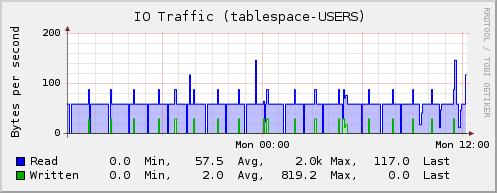
IO per Tablespace
Based on the following query:
 <Query "io_per_tablespace">
   Statement "SELECT sum(vf.PHYBLKRD)*8192 AS PHY_BLK_R, \
                     sum(vf.PHYBLKWRT)*8192 AS PHY_BLK_W, \
                     'tablespace' AS i_prefix, \
                     dt.tablespace_name \
                  FROM ((dba_data_files dd JOIN v$filestat vf ON dd.file_id = vf.file# ) \
                        JOIN dba_tablespaces dt ON dd.tablespace_name = dt.tablespace_name) \
                  GROUP BY dt.tablespace_name"
   <Result>
     Type "io_octets"
     InstancesFrom "i_prefix" "TABLESPACE_NAME"
     ValuesFrom "PHY_BLK_R" "PHY_BLK_W"
   </Result>
 </Query>
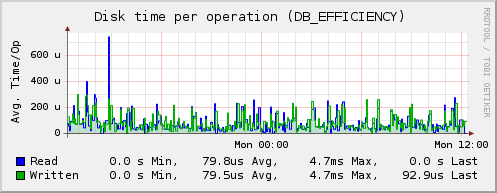
DB efficiency
Based on the following query:
 <Query "db_efficientcy">
   Statement "SELECT round(sum(decode(METRIC_NAME, 'Database Wait Time Ratio', value)),2) AS DATABASE_WAIT_TIME_RATIO, \
                     round(sum(decode(METRIC_NAME, 'Database CPU Time Ratio', value)),2) AS DATABASE_CPU_TIME_RATIO, \
                     'DB_EFFICIENCY' AS DB_EFFICIENCY \
                  FROM SYS.V_$SYSMETRIC \
                  WHERE METRIC_NAME IN ('Database CPU Time Ratio', 'Database Wait Time Ratio') \
                      AND INTSIZE_CSEC = (SELECT max(INTSIZE_CSEC) FROM SYS.V_$SYSMETRIC)"
   <Result>
     Type "disk_time"
     InstancesFrom "DB_EFFICIENCY"
     ValuesFrom "DATABASE_WAIT_TIME_RATIO" "DATABASE_CPU_TIME_RATIO"
   </Result>
 </Query>
License
Because the GPLv2 (the license of the Oracle plugin itself) and the “Oracle® Technology Network License” (OTN) are not compatible, an exception to the GPL has been added to the licensing terms of the Oracle plugin, allowing users to link against the “Oracle® Call Interface” (OCI).
The exception reads:
 Linking src/oracle.c ("the oracle plugin") statically or dynamically with
 other modules is making a combined work based on the oracle plugin. Thus,
 the terms and conditions of the GNU General Public License cover the whole
 combination.

 In addition, as a special exception, the copyright holders of the oracle
 plugin give you permission to combine the oracle plugin with free software
 programs or libraries that are released under the GNU LGPL and with code
 included in the standard release of the Oracle® Call Interface (OCI) under
 the Oracle® Technology Network (OTN) License (or modified versions of such
 code, with unchanged license). You may copy and distribute such a system
 following the terms of the GNU GPL for the oracle plugin and the licenses of
 the other code concerned.

 Note that people who make modified versions of the oracle plugin are not
 obligated to grant this special exception for their modified versions; it is
 their choice whether to do so. The GNU General Public License gives
 permission to release a modified version without this exception; this
 exception also makes it possible to release a modified version which carries
 forward this exception. However, without this exception the OTN License does
 not allow linking with code licensed under the GNU General Public License.

 Oracle® is a registered trademark of Oracle Corporation and/or its
 affiliates. Other names may be trademarks of their respective owners.
Building the Oracle plugin
You need to set or export the ORACLE_HOME environment variable before running the configure script in order for it to find the appropriate headers and shared objects. For example:
The end of the configure output should contain:
Building with Oracle Instant Client
Oracle provides an "Instant Client" software package which provides all the necessary libraries and headers required by the Oracle plugin to build successfully.
For some reason Oracle chose to store the files in locations that differ from a regular installation of Oracle Client in these packages.
Here is how you get going: Install the following packages:
- oracle-instantclient11.2-basic
- oracle-instantclient11.2-devel
With super user privileges execute the following commands:
 mkdir /usr/lib/oracle/11.2/client64/rdbms
 ln -s /usr/include/oracle/11.2/client64 /usr/lib/oracle/11.2/client64/rdbms/public
 export ORACLE_HOME=/usr/lib/oracle/11.2/client64
Now the plugin should build.
Caveats
Native Language Support
collectd uses strtod and strto[u]ll to parse the strings returned from the database. If the database returns values with a different language setting, parsing may fail. You should therefore set the environment variable NLS_LANG to specify how floating point numbers are returned. For example by setting the appropriate environment variable in a file that is sourced by the init script:
Dependencies
- OCI
libclntsh(An Oracle library with a mystic name. Should be part of OCI.)- Suitable values for LD_LIBRARY_PATH and ORACLE_HOME have to be provided.
Configuration
Configuration options · from collectd.conf(5)
See this section in the full configuration reference
The "oracle" plugin uses the Oracle® Call Interface (OCI) to connect to an Oracle® Database and lets you execute SQL statements there. It is very similar to the "dbi" plugin, because it was written around the same time. See the "dbi" plugin's documentation above for details.
<Plugin oracle>
  <Query "out_of_stock">
    Statement "SELECT category, COUNT(*) AS value FROM products WHERE in_stock = 0 GROUP BY category"
    <Result>
      Type "gauge"
      # InstancePrefix "foo"
      InstancesFrom "category"
      ValuesFrom "value"
    </Result>
  </Query>
  <Database "product_information">
    #Plugin "warehouse"
    ConnectID "db01"
    Username "oracle"
    Password "secret"
    Query "out_of_stock"
  </Database>
</Plugin>
Query blocks
The Query blocks are handled identically to the Query blocks of the "dbi" plugin. Please see its documentation above for details on how to specify queries.
Database blocks
Database blocks define a connection to a database and which queries should be sent to that database. Each database needs a "name" as string argument in the starting tag of the block. This name will be used as "PluginInstance" in the values submitted to the daemon. Other than that, that name is not used.
- Plugin Plugin
- Use Plugin as the plugin name when submitting query results from this Database. Defaults to
oracle. - ConnectID ID
- Defines the "database alias" or "service name" to connect to. Usually, these names are defined in the file named
$ORACLE_HOME/network/admin/tnsnames.ora. - Host Host
- Hostname to use when dispatching values for this database. Defaults to using the global hostname of the collectd instance.
- Username Username
- Username used for authentication.
- Password Password
- Password used for authentication.
- Query QueryName
- Associates the query named QueryName with this database connection. The query needs to be defined before this statement, i. e. all query blocks you want to refer to must be placed above the database block you want to refer to them from.