ping plugin
| Plugin name | ping |
| Type | read |
| Callbacks | config, init, read, shutdown |
| Status | supported |
| Since | 1.0 |
| Copyright | 2005–2012 Florian Forster |
| License | MIT License |
| Configuration | collectd.conf(5) |
Description
The Ping plugin measures network latency using ICMP “echo requests”, usually known as “ping”. Network latency is measured as a round-trip time. An ICMP “echo request” is sent to a host and the time needed for its echo-reply to arrive is measured. If a reply is not received within one second, the plugin will no longer expect a reply and return. This may happen in several circumstances, e. g. the packet is lost, the host is down, a router has dismissed the packet, …
This plugin is a generic plugin, i.e. it cannot work without configuration, because there is no reasonable default behavior. Please read the Plugin ping section of the collectd.conf(5) manual page for an in-depth description of the plugin's configuration.
Synopsis
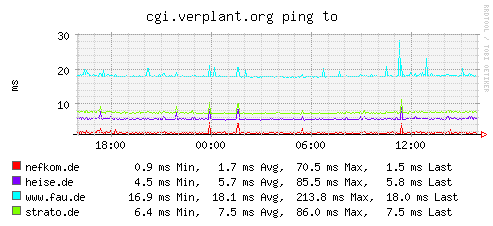
Example graph
Dependencies
Configuration
Configuration options · from collectd.conf(5)
See this section in the full configuration reference
The Ping plugin starts a new thread which sends ICMP "ping" packets to the configured hosts periodically and measures the network latency. Whenever the read function of the plugin is called, it submits the average latency, the standard deviation and the drop rate for each host.
Available configuration options:
- Host IP-address
- Host to ping periodically. This option may be repeated several times to ping multiple hosts.
- Interval Seconds
-
Sets the interval in which to send ICMP echo packets to the configured hosts. This is not the interval in which metrics are read from the plugin but the interval in which the hosts are "pinged". Therefore, the setting here should be smaller than or equal to the global Interval setting. Fractional times, such as "1.24" are allowed.
Default: 1.0
- Timeout Seconds
-
Time to wait for a response from the host to which an ICMP packet had been sent. If a reply was not received after Seconds seconds, the host is assumed to be down or the packet to be dropped. This setting must be smaller than the Interval setting above for the plugin to work correctly. Fractional arguments are accepted.
Default: 0.9
- TTL 0-255
- Sets the Time-To-Live of generated ICMP packets.
- Size size
- Sets the size of the data payload in ICMP packet to specified size (it will be filled with regular ASCII pattern). If not set, default 56 byte long string is used so that the packet size of an ICMPv4 packet is exactly 64 bytes, similar to the behaviour of normal ping(1) command.
- SourceAddress host
- Sets the source address to use. host may either be a numerical network address or a network hostname.
- AddressFamily af
- Sets the address family to use. af may be "any", "ipv4" or "ipv6". This option will be ignored if you set a SourceAddress.
- Device name
- Sets the outgoing network device to be used. name has to specify an interface name (e. g.
eth0). This might not be supported by all operating systems. - MaxMissed Packets
-
Trigger a DNS resolve after the host has not replied to Packets packets. This enables the use of dynamic DNS services (like dyndns.org) with the ping plugin.
Default: -1 (disabled)