bind plugin
| Plugin name | bind |
| Type | read |
| Callbacks | config, init, read, shutdown |
| Status | supported |
| Since | 4.6 |
| Copyright | 2009 Bruno Prémont, 2009 Florian octo Forster |
| License | GPLv2 |
| Configuration | collectd.conf(5) |
Description
Starting with BIND 9.5.0, the most widely used DNS server software provides extensive statistics about queries, responses and lots of other information. The BIND plugin retrieves this information that's encoded in XML and provided via HTTP and submits the values to collectd.
This differs from the approach taken by the DNS plugin: The DNS plugin uses libpcap to capture (“sniff”) the network traffic and analyzes the DNS packets itself. Because it received the information from the BIND daemon, the BIND plugin can provide a level of detail the DNS plugin can't achieve, because it's missing the required information or acquiring that information would be too hard.
To see all the statistics provided by BIND, configure the statistics-channels as outlined below and point an XML-enabled browser to the appropriate port, for example http://localhost:8053/. The statistics recognized and handled by collectd are:
Global statistics
- OpCodes
- Query types (A, MX, AAAA, …)
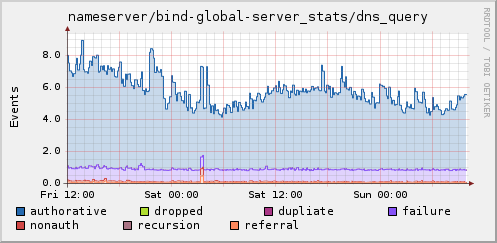
- Overall server statistics (#Queries, #Responses, …)
- Zone maintenance statistics (#Notifications, #Updates, …)
- Resolver statistics (usually empty)
- Memory statistics
Per-view statistics
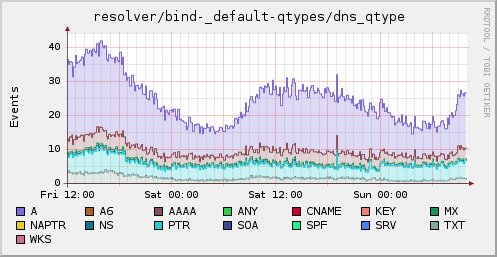
- Query types
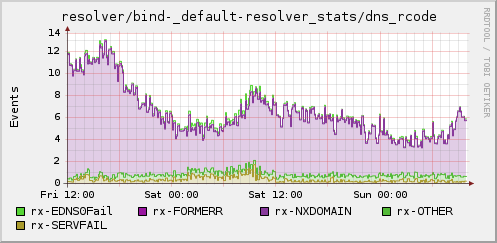
- Resolver statistics (#Queries, #Responses, #NXDOMAIN, …)
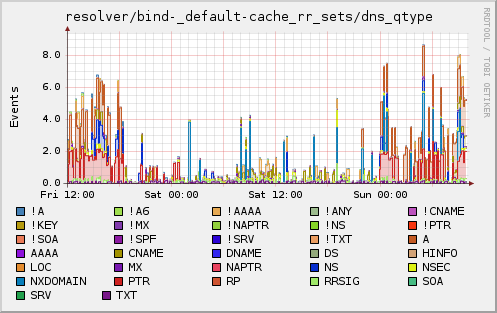
- RR-set cache statistics (#entries by type)
Per-zone statistics
- Overall statistics (Success, #NXRRSET, …)
Synopsis
BIND configuration:
collectd configuration:
 <Plugin "bind">
   <nowiki>URL "http://localhost:8053/"</nowiki>
   OpCodes         true
   QTypes          true

   ServerStats     true
   ZoneMaintStats  true
   ResolverStats   false
   MemoryStats     true

   <View "_default">
     QTypes        true
     ResolverStats true
     CacheRRSets   true

     Zone "127.in-addr.arpa/IN"
   </View>
 </Plugin>
Example graphs
Resolver specific graphs
Global statistics
Dependencies
See also
Configuration
Configuration options · from collectd.conf(5)
See this section in the full configuration reference
Starting with BIND 9.5.0, the most widely used DNS server software provides extensive statistics about queries, responses and lots of other information. The bind plugin retrieves this information that's encoded in XML and provided via HTTP and submits the values to collectd.
To use this plugin, you first need to tell BIND to make this information available. This is done with the statistics-channels configuration option:
The configuration follows the grouping that can be seen when looking at the data with an XSLT compatible viewer, such as a modern web browser. It's probably a good idea to make yourself familiar with the provided values, so you can understand what the collected statistics actually mean.
Synopsis:
<Plugin "bind">
  URL "http://localhost:8053/"
  ParseTime       false
  OpCodes         true
  QTypes          true

ServerStats     true
ZoneMaintStats  true
ResolverStats   false
MemoryStats     true

<View "_default">
  QTypes        true
  ResolverStats true
  CacheRRSets   true

    Zone "127.in-addr.arpa/IN"
  </View>
</Plugin>
The bind plugin accepts the following configuration options:
- URL URL
- URL from which to retrieve the XML data. If not specified,
http://localhost:8053/will be used. - ParseTime true|false
-
When set to true, the time provided by BIND will be parsed and used to dispatch the values. When set to false, the local time source is queried.
This setting is set to true by default for backwards compatibility; setting this to false is recommended to avoid problems with timezones and localization.
- OpCodes true|false
-
When enabled, statistics about the "OpCodes", for example the number of
QUERYpackets, are collected.Default: Enabled.
- QTypes true|false
-
When enabled, the number of incoming queries by query types (for example
A,MX,AAAA) is collected.Default: Enabled.
- ServerStats true|false
-
Collect global server statistics, such as requests received over IPv4 and IPv6, successful queries, and failed updates.
Default: Enabled.
- ZoneMaintStats true|false
-
Collect zone maintenance statistics, mostly information about notifications (zone updates) and zone transfers.
Default: Enabled.
- ResolverStats true|false
-
Collect resolver statistics, i. e. statistics about outgoing requests (e. g. queries over IPv4, lame servers). Since the global resolver counters apparently were removed in BIND 9.5.1 and 9.6.0, this is disabled by default. Use the ResolverStats option within a View "_default" block instead for the same functionality.
Default: Disabled.
- MemoryStats
-
Collect global memory statistics.
Default: Enabled.
- Timeout Milliseconds
- The Timeout option sets the overall timeout for HTTP requests to URL, in milliseconds. By default, the configured Interval is used to set the timeout.
- View Name
-
Collect statistics about a specific "view". BIND can behave different, mostly depending on the source IP-address of the request. These different configurations are called "views". If you don't use this feature, you most likely are only interested in the
_defaultview.Within a <View name> block, you can specify which information you want to collect about a view. If no View block is configured, no detailed view statistics will be collected.
- QTypes true|false
-
If enabled, the number of outgoing queries by query type (e. g.
A,MX) is collected.Default: Enabled.
- ResolverStats true|false
-
Collect resolver statistics, i. e. statistics about outgoing requests (e. g. queries over IPv4, lame servers).
Default: Enabled.
- CacheRRSets true|false
-
If enabled, the number of entries ("RR sets") in the view's cache by query type is collected. Negative entries (queries which resulted in an error, for example names that do not exist) are reported with a leading exclamation mark, e. g. "!A".
Default: Enabled.
- Zone Name
-
When given, collect detailed information about the given zone in the view. The information collected if very similar to the global ServerStats information (see above).
You can repeat this option to collect detailed information about multiple zones.
By default no detailed zone information is collected.