virt plugin
| Plugin name | virt |
| Type | read |
| Callbacks | config, init, read, shutdown |
| Status | supported |
| Since | 4.3 |
| Copyright | 2007–2008 Red Hat Inc., 2007–2008 Florian octo Forster |
| License | GPLv2 |
| Configuration | collectd.conf(5) |
The virt plugin uses the virtualization API libvirt, created by RedHat's Emerging Technology group, to gather statistics about virtualized guests on a system. This way, you can collect CPU, network interface and block device usage for each guest without installing collectd on the guest systems. Because the statistics are received from the hypervisor directly, this works not only with para-virtualized hosts, but with hardware virtualized machines, too.
The used libvirt library provides abstracted access to a number of virtualization techniques. At the moment (April 2010), the Xen, Qemu and KVM backends are able to provide the collected statistics.
Other statistics than the ones listed above can not be collected through this plugin. For more detailed statistics you will need to install collectd on each guest and use the Network plugin to transmit the statistics.
The plugin can be configured to only collect specific domains, block devices or interfaces. For a full description of available options please refer to the collectd.conf(5) manual page.
Synopsis
The virt plugin collects statistics by using virtualization API. Metrics are gathered directly from the hypervisor on a host system, which means that collectd doesn’t have to be installed and configured on a guest system. Extended metrics can be enabled with virt plugin configuration option. Here is an example of the plugin configuration section of collectd.conf file:
 <Plugin "virt">
   Connection "xen:///"
   RefreshInterval 60
   #Domain "name"
   #BlockDevice "name:device"
   #InterfaceDevice "name:interface"
   #IgnoreSelected false
   HostnameFormat "name"
   ExtraStats "cpu_util disk_err domain_state fs_info job_stats_background perf vcpupin"
 </Plugin>
Parameters
|
|
|
|
|---|---|---|---|
|
|
|
|
Metrics
|
|
|
|
|
|
|
|
|
|
|---|---|---|---|---|---|---|---|---|---|
|
|
|
|
|
|
|
|
|
|
|
|
|
|
|
|
|
|
|
|
|
|
|
|
|
|
|
|
|
|
|
|
|
|
|
|
|
|
|
|
|
|
|
|
|
|
|
|
|
|
|
|
|
|
|
|
|
|
|
|
|
|
|
|
|
|
|
|
|
|
|
|
|
|
|
|
|
|
|
|
|
|
|
|
|
|
|
|
|
|
|
|
|
|
|
|
|
|
|
|
|
|
|
|
|
|
|
|
|
|
|
|
|
|
|
|
|
|
|
|
|
|
|
|
|
|
|
|
|
|
|
|
|
|
|
|
|
|
|
|
|
|
|
|
|
|
|
|
|
|
Example graphs
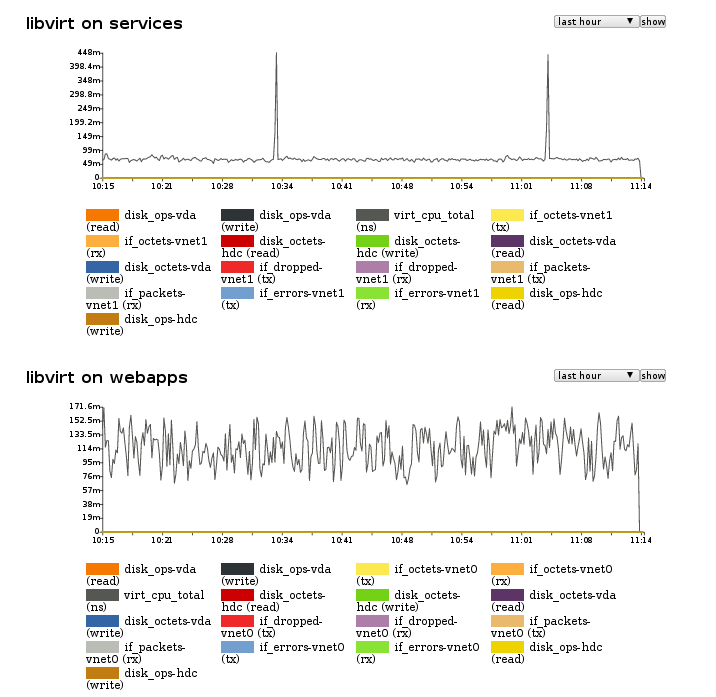
Example graphs showing primarily (virt) cpu usage of two guests - services and webapps.
History
This plugin was originally called libvirt, which caused problems with collectd's build system due to the lib prefix. It has been renamed to simply virt in version-5.5.
Dependencies
See also
- Plugin-virt-Tests
- Virt extensions high level design document
Configuration
Configuration options · from collectd.conf(5)
See this section in the full configuration reference
This plugin allows CPU, disk, network load and other metrics to be collected for virtualized guests on the machine. The statistics are collected through libvirt API (http://libvirt.org/). Majority of metrics can be gathered without installing any additional software on guests, especially collectd, which runs only on the host system.
Only Connection is required.
Consider the following example config:
<Plugin "virt">
  Connection "qemu:///system"
  HostnameFormat "hostname"
  InterfaceFormat "address"
  PluginInstanceFormat "name"
</Plugin>
It will generate the following values:
node42.example.com/virt-instance-0006f26c/disk_octets-vda
node42.example.com/virt-instance-0006f26c/disk_ops-vda
node42.example.com/virt-instance-0006f26c/if_dropped-ca:fe:ca:fe:ca:fe
node42.example.com/virt-instance-0006f26c/if_errors-ca:fe:ca:fe:ca:fe
node42.example.com/virt-instance-0006f26c/if_octets-ca:fe:ca:fe:ca:fe
node42.example.com/virt-instance-0006f26c/if_packets-ca:fe:ca:fe:ca:fe
node42.example.com/virt-instance-0006f26c/memory-actual_balloon
node42.example.com/virt-instance-0006f26c/memory-available
node42.example.com/virt-instance-0006f26c/memory-last_update
node42.example.com/virt-instance-0006f26c/memory-major_fault
node42.example.com/virt-instance-0006f26c/memory-minor_fault
node42.example.com/virt-instance-0006f26c/memory-rss
node42.example.com/virt-instance-0006f26c/memory-swap_in
node42.example.com/virt-instance-0006f26c/memory-swap_out
node42.example.com/virt-instance-0006f26c/memory-total
node42.example.com/virt-instance-0006f26c/memory-unused
node42.example.com/virt-instance-0006f26c/memory-usable
node42.example.com/virt-instance-0006f26c/virt_cpu_total
node42.example.com/virt-instance-0006f26c/virt_vcpu-0
You can get information on the metric's units from the online libvirt documentation. For instance, virt_cpu_total is in nanoseconds.
- Connection uri
-
Connect to the hypervisor given by uri. For example if using Xen use:
Details which URIs allowed are given at http://libvirt.org/uri.html.
- RefreshInterval seconds
-
Refresh the list of domains and devices every seconds. The default is 60 seconds. Setting this to be the same or smaller than the Interval will cause the list of domains and devices to be refreshed on every iteration.
Refreshing the devices in particular is quite a costly operation, so if your virtualization setup is static you might consider increasing this. If this option is set to 0, refreshing is disabled completely.
- Domain name
- BlockDevice name:dev
- InterfaceDevice name:dev
- IgnoreSelected true|false
-
Select which domains and devices are collected.
If IgnoreSelected is not given or false then only the listed domains and disk/network devices are collected.
If IgnoreSelected is true then the test is reversed and the listed domains and disk/network devices are ignored, while the rest are collected.
The domain name and device names may use a regular expression, if the name is surrounded by /.../ and collectd was compiled with support for regexps.
The default is to collect statistics for all domains and all their devices.
Note: BlockDevice and InterfaceDevice options are related to corresponding *Format options. Specifically, BlockDevice filtering depends on BlockDeviceFormat setting - if user wants to filter block devices by 'target' name then BlockDeviceFormat option has to be set to 'target' and BlockDevice option must be set to a valid block device target name("/:hdb/"). Mixing formats and filter values from different worlds (i.e., using 'target' name as BlockDevice value with BlockDeviceFormat set to 'source') may lead to unexpected results (all devices filtered out or all visible, depending on the value of IgnoreSelected option). Similarly, option InterfaceDevice is related to InterfaceFormat setting (i.e., when user wants to use MAC address as a filter then InterfaceFormat has to be set to 'address' - using wrong type here may filter out all of the interfaces).
Example 1:
Ignore all hdb devices on any domain, but other block devices (eg. hda) will be collected:
Example 2:
Collect metrics only for block device on 'baremetal0' domain when its 'source' matches given path:
As you can see it is possible to filter devices/interfaces using various formats - for block devices 'target' or 'source' name can be used. Interfaces can be filtered using 'name', 'address' or 'number'.
Example 3:
Collect metrics only for domains 'baremetal0' and 'baremetal1' and ignore any other domain:
It is possible to filter multiple block devices/domains/interfaces by adding multiple filtering entries in separate lines.
- BlockDeviceFormat target|source
-
If BlockDeviceFormat is set to target, the default, then the device name seen by the guest will be used for reporting metrics. This corresponds to the
<targetE<gt> node in the XML definition of the domain.If BlockDeviceFormat is set to source, then metrics will be reported using the path of the source, e.g. an image file. This corresponds to the
<sourceE<gt> node in the XML definition of the domain.Example:
If the domain XML have the following device defined:
<disk type='block' device='disk'>
  <driver name='qemu' type='raw' cache='none' io='native' discard='unmap'/>
  <source dev='/var/lib/libvirt/images/image1.qcow2'/>
  <target dev='sda' bus='scsi'/>
  <boot order='2'/>
  <address type='drive' controller='0' bus='0' target='0' unit='0'/>
</disk>
Setting
BlockDeviceFormat targetwill cause the type instance to be set tosda. SettingBlockDeviceFormat sourcewill cause the type instance to be set tovar_lib_libvirt_images_image1.qcow2.Note: this option determines also what field will be used for filtering over block devices (filter value in BlockDevice will be applied to target or source). More info about filtering block devices can be found in the description of BlockDevice.
- BlockDeviceFormatBasename false|true
-
The BlockDeviceFormatBasename controls whether the full path or the
basename(1)of the source is being used as the type instance when BlockDeviceFormat is set to source. Defaults to false.Example:
Assume the device path (source tag) is
/var/lib/libvirt/images/image1.qcow2. SettingBlockDeviceFormatBasename falsewill cause the type instance to be set tovar_lib_libvirt_images_image1.qcow2. SettingBlockDeviceFormatBasename truewill cause the type instance to be set toimage1.qcow2. - HostnameFormat name|uuid|hostname|metadata...
-
When the virt plugin logs data, it sets the hostname of the collected data according to this setting. The default is to use the guest name as provided by the hypervisor, which is equal to setting name.
uuid means use the guest's UUID. This is useful if you want to track the same guest across migrations.
hostname means to use the global Hostname setting, which is probably not useful on its own because all guests will appear to have the same name. This is useful in conjunction with PluginInstanceFormat though.
metadata means use information from guest's metadata. Use HostnameMetadataNS and HostnameMetadataXPath to localize this information.
You can also specify combinations of these fields. For example name uuid means to concatenate the guest name and UUID (with a literal colon character between, thus "foo:1234-1234-1234-1234").
At the moment of writing (collectd-5.5), hostname string is limited to 62 characters. In case when combination of fields exceeds 62 characters, hostname will be truncated without a warning.
- InterfaceFormat name|address|number
-
When the virt plugin logs interface data, it sets the name of the collected data according to this setting. The default is to use the path as provided by the hypervisor (the "dev" property of the target node), which is equal to setting name.
address means use the interface's mac address. This is useful since the interface path might change between reboots of a guest or across migrations.
number means use the interface's number in guest.
Note: this option determines also what field will be used for filtering over interface device (filter value in InterfaceDevice will be applied to name, address or number). More info about filtering interfaces can be found in the description of InterfaceDevice.
- PluginInstanceFormat name|uuid|metadata|none
-
When the virt plugin logs data, it sets the plugin_instance of the collected data according to this setting. The default is to not set the plugin_instance.
name means use the guest's name as provided by the hypervisor. uuid means use the guest's UUID. metadata means use information from guest's metadata.
You can also specify combinations of the name and uuid fields. For example name uuid means to concatenate the guest name and UUID (with a literal colon character between, thus "foo:1234-1234-1234-1234").
- HostnameMetadataNS string
- When metadata is used in HostnameFormat or PluginInstanceFormat, this selects in which metadata namespace we will pick the hostname. The default is http://openstack.org/xmlns/libvirt/nova/1.0.
- HostnameMetadataXPath string
- When metadata is used in HostnameFormat or PluginInstanceFormat, this describes where the hostname is located in the libvirt metadata. The default is /instance/name/text().
- ReportBlockDevices true|false
- Enabled by default. Allows to disable stats reporting of block devices for whole plugin.
- ReportNetworkInterfaces true|false
- Enabled by default. Allows to disable stats reporting of network interfaces for whole plugin.
- ExtraStats string
-
Report additional extra statistics. The default is no extra statistics, preserving the previous behaviour of the plugin. If unsure, leave the default. If enabled, allows the plugin to reported more detailed statistics about the behaviour of Virtual Machines. The argument is a space-separated list of selectors.
Currently supported selectors are:
- cpu_util: report CPU utilization per domain in percentage.
- disk: report extra statistics like number of flush operations and total service time for read, write and flush operations. Requires libvirt API version 0.9.5 or later.
- disk_err: report disk errors if any occured. Requires libvirt API version 0.9.10 or later.
- domain_state: report domain state and reason as 'domain_state' metric.
- fs_info: report file system information as a notification. Requires libvirt API version 1.2.11 or later. Can be collected only if Guest Agent is installed and configured inside VM. Make sure that installed Guest Agent version supports retrieving file system information.
- job_stats_background: report statistics about progress of a background job on a domain. Only one type of job statistics can be collected at the same time. Requires libvirt API version 1.2.9 or later.
- job_stats_completed: report statistics about a recently completed job on a domain. Only one type of job statistics can be collected at the same time. Requires libvirt API version 1.2.9 or later.
- memory: report statistics about memory usage details, provided by libvirt virDomainMemoryStats() function.
- pcpu: report the physical user/system cpu time consumed by the hypervisor, per-vm. Requires libvirt API version 0.9.11 or later.
- perf: report performance monitoring events. To collect performance metrics they must be enabled for domain and supported by the platform. Requires libvirt API version 1.3.3 or later. Note: perf metrics can't be collected if intel_rdt plugin is enabled.
- vcpu: report domain virtual CPUs utilisation.
- vcpupin: report pinning of domain VCPUs to host physical CPUs.
- disk_physical: report 'disk_physical' statistic for disk device. Note: This statistic is only reported for disk devices with 'source' property available.
- disk_allocation: report 'disk_allocation' statistic for disk device. Note: This statistic is only reported for disk devices with 'source' property available.
- disk_capacity: report 'disk_capacity' statistic for disk device. Note: This statistic is only reported for disk devices with 'source' property available.
- PersistentNotification true|false
- Override default configuration to only send notifications when there is a change in the lifecycle state of a domain. When set to true notifications will be sent for every read cycle. Default is false. Does not affect the stats being dispatched.
- Instances integer
-
How many read instances you want to use for this plugin. The default is one, and the sensible setting is a multiple of the ReadThreads value.
This option is only useful when domains are specially tagged. If you are not sure, just use the default setting.
The reader instance will only query the domains with attached matching tag. Tags should have the form of 'virt-X' where X is the reader instance number, starting from 0.
The special-purpose reader instance #0, guaranteed to be always present, will query all the domains with missing or unrecognized tag, so no domain will ever be left out.
Domain tagging is done with a custom attribute in the libvirt domain metadata section. Value is selected by an XPath /domain/metadata/ovirtmap/tag/text() expression in the http://ovirt.org/ovirtmap/tag/1.0 namespace. (XPath and namespace values are not configurable yet).
Tagging could be used by management applications to evenly spread the load among the reader threads, or to pin on the same threads all the libvirt domains which use the same shared storage, to minimize the disruption in presence of storage outages.