tcpconns plugin
| Plugin name | tcpconns |
| Type | read |
| Callbacks | config, init, read |
| Status | supported |
| Since | 4.2 |
| Copyright | 2007–2008 Florian octo Forster, 2008 Michael Stapelberg |
| License | GPLv2, BSD License |
| Configuration | collectd.conf(5) |
The TCPConns plugin counts the number of TCP connections to or from a specified port. Typically the connections where you specify the local port are incoming connections while the connections where you specify the remote port are outgoing connections.
Synopsis
Single port
Multiple ports
All listening ports
Summary of all ports
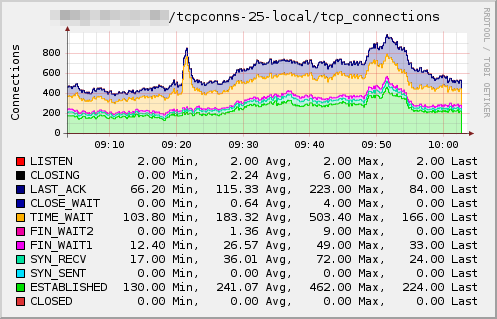
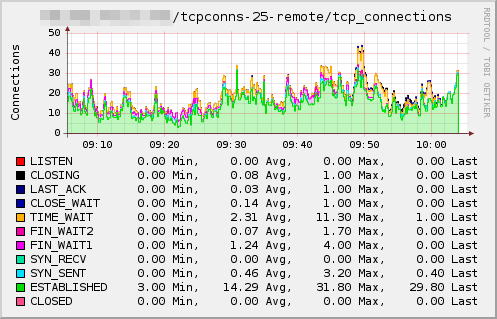
Example graphs
Dependencies
- Linux
/proc-file system
- Mac OS X (possibly also other *BSDs)
sysctlbyname(3)
Configuration
Configuration options · from collectd.conf(5)
See this section in the full configuration reference
The tcpconns plugin counts the number of currently established TCP connections based on the local port and/or the remote port. Since there may be a lot of connections the default if to count all connections with a local port, for which a listening socket is opened. You can use the following options to fine-tune the ports you are interested in:
- ListeningPorts true|false
- If this option is set to true, statistics for all local ports for which a listening socket exists are collected. The default depends on LocalPort and RemotePort (see below): If no port at all is specifically selected, the default is to collect listening ports. If specific ports (no matter if local or remote ports) are selected, this option defaults to false, i. e. only the selected ports will be collected unless this option is set to true specifically.
- LocalPort Port
- Count the connections to a specific local port. This can be used to see how many connections are handled by a specific daemon, e. g. the mailserver. You have to specify the port in numeric form, so for the mailserver example you'd need to set 25.
- RemotePort Port
- Count the connections to a specific remote port. This is useful to see how much a remote service is used. This is most useful if you want to know how many connections a local service has opened to remote services, e. g. how many connections a mail server or news server has to other mail or news servers, or how many connections a web proxy holds to web servers. You have to give the port in numeric form.
- AllPortsSummary true|false
- If this option is set to true a summary of statistics from all connections are collected. This option defaults to false.