mysql plugin
| Plugin name | mysql |
| Type | read |
| Callbacks | config, read |
| Status | supported |
| Since | 3.6 |
| Copyright | 2006–2010 Florian Forster, 2008 Mirko Buffoni, 2009 Doug MacEachern, 2009 Sebastian Harl, 2009 Rodolphe Quiédeville |
| License | GPLv2 |
| Configuration | collectd.conf(5) |
Description
The MySQL plugin connects to an MariaDB or MySQL-database and issues a SHOW STATUS command periodically. The command returns the server status variables, many of which are collected. The plugin has successfully been tested with the MySQL versions 4 and 5.
If you're looking for a way to create statistics by executing and interpreting SQL statements, take a look at the DBI plugin.
If you hoped to find a way to store data in a MySQL database, you're unfortunately out of luck since that is not possible (yet). It does not exist, because we didn't come up with suitable concept yet. You can help us by adding your thoughts and ideas to the “Store-To-RDBMS” page. Actually writing the code is not the issue.
Synopsis
Version 4.7 and later:
 <Plugin "mysql">
   <Database "foo">
     Host "hostname"
     User "username"
     Password "password"
     Port 3306
     <span style="color: gray;"># Since [[version-5.0]]:</span>
     <span style="color: gray;">#Port "3306"</span>
     MasterStats true
   </Database>

   <Database "bar">
     Host "localhost"
     Socket "/var/run/mysql/mysqld.sock"
     SlaveStats true
     SlaveNotifications true
   </Database>
 </Plugin>
Version 4.6 and before:
 <Plugin "mysql">
   Host "localhost"
   User "collectd"
   Password "fee4eeCu"
   #Database "db_name"
   #Port "3306"
   #Socket "/path/to/unix/socket"
 </Plugin>
SQL required to create a user for collectd:
 CREATE USER 'collectd'@'localhost' IDENTIFIED BY 'Fat4ohse';
 -- Give appropriate permissions
 -- ("GRANT USAGE" is synonymous to "no privileges")
 GRANT USAGE ON *.* TO 'collectd'@'localhost';
 -- Permissions for the MasterStats and SlaveStats options
 GRANT REPLICATION CLIENT ON *.* TO 'collectd'@'localhost';
The new user will only have privileges to connect to the database. Additional privileges are not required.
Collected statistics
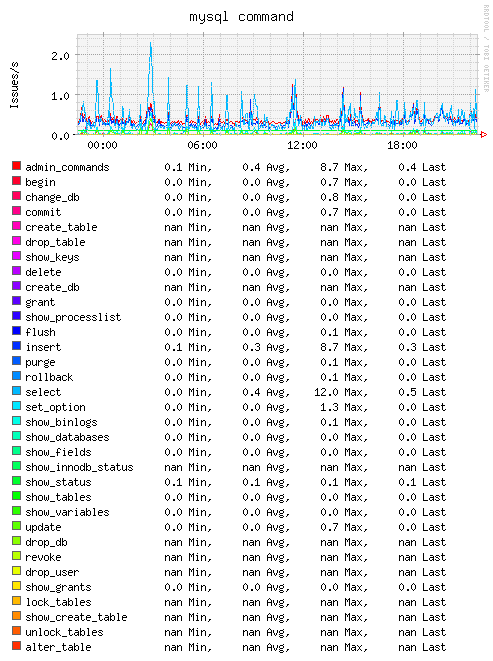
Command statistics
These values contain the number of issues per second for various SQL-commands. Counters that are zero (i. e. the command has never been issued since server startup) are ignored, since graphing all commands would create a lot of very uninteresting RRD-files which just eat up space..
Example graph
Handler statistics
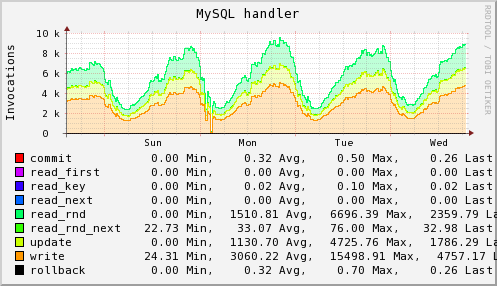
The handler statistics gathered basically refer to the operations that can be done on tables or table-rows. This graph can give you some information if your indexes are okay or if you need some work there. Read the server status variables documentation, though it leaves you with lots of questions. At least it left me wondering what was actually going on… ;)
Example graph
Query-cache statistics
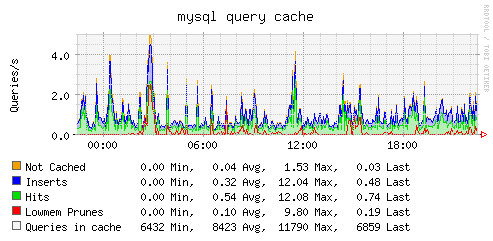
MySQL will try to cache queries (i. e. SELECT statements). Information about the query cache can be found on MySQL's homepage.
Example graph
Thread statistics
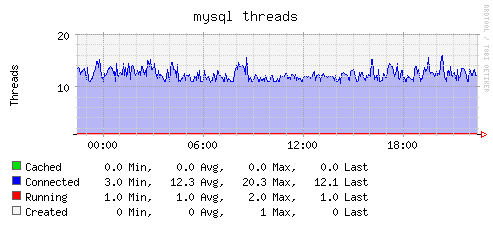
Information about the threads of the MySQL process(es).
Example graph
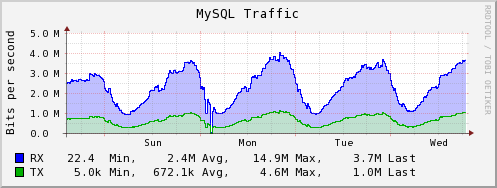
Traffic statistics
Information about incoming and outgoing traffic (bytes).
Example graph
Dependencies
- The MySQL library.
Configuration
Configuration options · from collectd.conf(5)
See this section in the full configuration reference
The mysql plugin requires mysqlclient to be installed. It connects to one or more databases when started and keeps the connection up as long as possible. When the connection is interrupted for whatever reason it will try to re-connect. The plugin will complain loudly in case anything goes wrong.
This plugin issues the MySQL SHOW STATUS / SHOW GLOBAL STATUS command and collects information about MySQL network traffic, executed statements, requests, the query cache and threads by evaluating the Bytes_{received,sent}, Com_*, Handler_*, Qcache_* and Threads_* return values. Please refer to the MySQL reference manual, 5.1.6. Server Status Variables for an explanation of these values.
Optionally, master and slave statistics may be collected in a MySQL replication setup. In that case, information about the synchronization state of the nodes are collected by evaluating the Position return value of the SHOW MASTER STATUS command and the Seconds_Behind_Master, Read_Master_Log_Pos and Exec_Master_Log_Pos return values of the SHOW SLAVE STATUS command. See the MySQL reference manual, 12.5.5.21 SHOW MASTER STATUS Syntax and 12.5.5.31 SHOW SLAVE STATUS Syntax for details.
Synopsis:
<Plugin mysql>
  <Database foo>
    Host "hostname"
    User "username"
    Password "password"
    Port "3306"
    MasterStats true
    ConnectTimeout 10
    SSLKey "/path/to/key.pem"
    SSLCert "/path/to/cert.pem"
    SSLCA "/path/to/ca.pem"
    SSLCAPath "/path/to/cas/"
    SSLCipher "DHE-RSA-AES256-SHA"
  </Database>

<Database bar>
  Alias "squeeze"
  Host "localhost"
  Socket "/var/run/mysql/mysqld.sock"
  SlaveStats true
  SlaveNotifications true
</Database>

 <Database galera>
    Alias "galera"
    Host "localhost"
    Socket "/var/run/mysql/mysqld.sock"
    WsrepStats true
 </Database>
</Plugin>
A Database block defines one connection to a MySQL database. It accepts a single argument which specifies the name of the database. None of the other options are required. MySQL will use default values as documented in the "mysql_real_connect()" and "mysql_ssl_set()" sections in the MySQL reference manual.
- Alias Alias
- Alias to use as sender instead of hostname when reporting. This may be useful when having cryptic hostnames.
- Host Hostname
- Hostname of the database server. Defaults to localhost.
- User Username
- Username to use when connecting to the database. The user does not have to be granted any privileges (which is synonym to granting the
USAGEprivilege), unless you want to collect replication statistics (see MasterStats and SlaveStats below). In this case, the user needs theREPLICATION CLIENT(orSUPER) privileges. Else, any existing MySQL user will do. - Password Password
- Password needed to log into the database.
- Database Database
- Select this database. Defaults to no database which is a perfectly reasonable option for what this plugin does.
- Port Port
-
TCP-port to connect to. The port must be specified in its numeric form, but it must be passed as a string nonetheless. For example:
If Host is set to localhost (the default), this setting has no effect. See the documentation for the
mysql_real_connectfunction for details. - Socket Socket
- Specifies the path to the UNIX domain socket of the MySQL server. This option only has any effect, if Host is set to localhost (the default). Otherwise, use the Port option above. See the documentation for the
mysql_real_connectfunction for details. - InnodbStats true|false
- If enabled, metrics about the InnoDB storage engine are collected. Disabled by default.
- MasterStats true|false
- SlaveStats true|false
- Enable the collection of master / slave statistics in a replication setup. In order to be able to get access to these statistics, the user needs special privileges. See the User documentation above. Defaults to false.
- SlaveNotifications true|false
- If enabled, the plugin sends a notification if the replication slave I/O and / or SQL threads are not running. Defaults to false.
- WsrepStats true|false
- Enable the collection of wsrep plugin statistics, used in Master-Master replication setups like in MySQL Galera/Percona XtraDB Cluster. User needs only privileges to execute 'SHOW GLOBAL STATUS'. Defaults to false.
- ConnectTimeout Seconds
- Sets the connect timeout for the MySQL client.
- SSLKey Path
- If provided, the X509 key in PEM format.
- SSLCert Path
- If provided, the X509 cert in PEM format.
- SSLCA Path
- If provided, the CA file in PEM format (check OpenSSL docs).
- SSLCAPath Path
- If provided, the CA directory (check OpenSSL docs).
- SSLCipher String
- If provided, the SSL cipher to use.