rrdcached plugin
| Plugin name | rrdcached |
| Type | write |
| Callbacks | config, init, read, shutdown, write |
| Status | supported |
| Since | 4.6 |
| Copyright | 2008–2013 Florian Forster |
| License | MIT License |
| Configuration | collectd.conf(5) |
The RRDCacheD plugin connects to the “RRD caching daemon”, rrdcached and submits updates for RRD files to that daemon. rrdcached is based on the RRDtool plugin of collectd and basically uses the same principles that are described in “Inside-the-RRDtool-plugin”.
Having the cache in a separate process is some more work to set up, but has nice benefits, especially for big setups: You can restart collectd without flushing the cache, have the cache on a remote server and, of course, applications other than collectd can make use of it.
rrdcached has been included in the RRDtool distribution since version 1.4.
Synopsis
 <Plugin "rrdcached">
   DaemonAddress "unix:/var/run/rrdcached.sock"
   DataDir "/var/lib/collectd/rrd"
   CreateFiles true
 </Plugin>
Example graphs
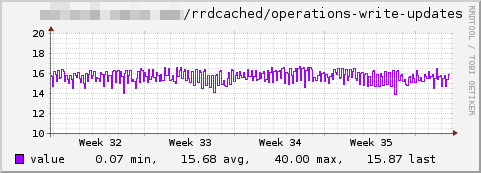 Number of write operations per second.
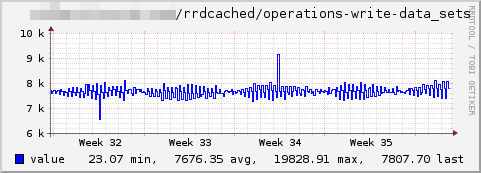 Values written to disk per second. Since many values are written in one write operation, the number of write operations per second is much lower. As you can see if you compare this graph with the one above, there are in average 490 data sets in one write operation.
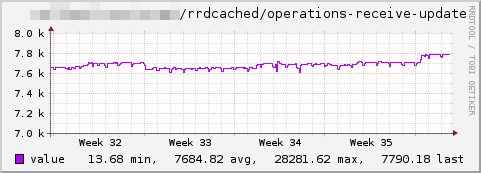 Number of update commands received per second.
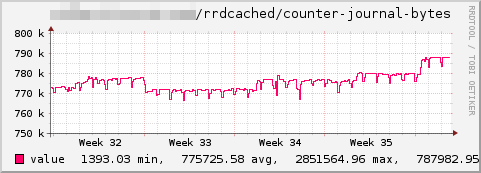 Bytes per second written to the journal.
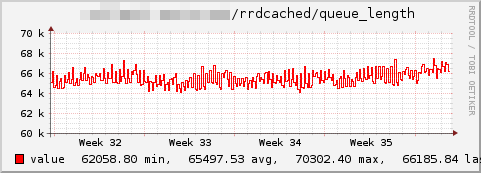 Length of the update queue.
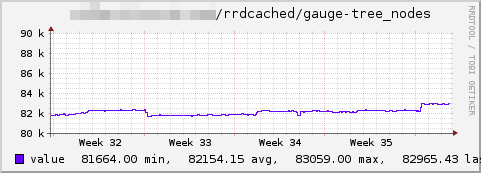 Number of nodes (RRD files) in the binary search tree of the caching daemon.
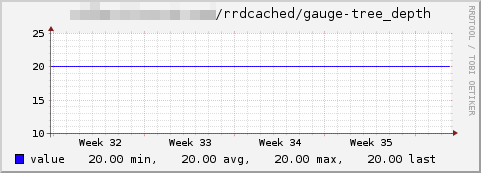 Depth of the binary search tree used by the daemon. This is basically the number of comparisons needed to find any file in the tree.
See also
Dependencies
- librrd (≧ 1.4. Version 1.3 is not recent enough!)
Configuration
Configuration options · from collectd.conf(5)
See this section in the full configuration reference
The rrdcached plugin uses the RRDtool accelerator daemon, rrdcached(1), to store values to RRD files in an efficient manner. The combination of the rrdcached plugin and the rrdcached daemon is very similar to the way the rrdtool plugin works (see below). The added abstraction layer provides a number of benefits, though: Because the cache is not within collectd anymore, it does not need to be flushed when collectd is to be restarted. This results in much shorter (if any) gaps in graphs, especially under heavy load. Also, the rrdtool command line utility is aware of the daemon so that it can flush values to disk automatically when needed. This allows one to integrate automated flushing of values into graphing solutions much more easily.
There are disadvantages, though: The daemon may reside on a different host, so it may not be possible for collectd to create the appropriate RRD files anymore. And even if rrdcached runs on the same host, it may run in a different base directory, so relative paths may do weird stuff if you're not careful.
So the recommended configuration is to let collectd and rrdcached run on the same host, communicating via a UNIX domain socket. The DataDir setting should be set to an absolute path, so that a changed base directory does not result in RRD files being createdE<nbsp>/ expected in the wrong place.
- DaemonAddress Address
-
Address of the daemon as understood by the
rrdc_connectfunction of the RRD library. Seerrdcached(1)for details. Example: - DataDir Directory
- Set the base directory in which the RRD files reside. If this is a relative path, it is relative to the working base directory of the
rrdcacheddaemon! Use of an absolute path is recommended. - CreateFiles true|false
- Enables or disables the creation of RRD files. If the daemon is not running locally, or DataDir is set to a relative path, this will not work as expected. Default is true.
- CreateFilesAsync false|true
- When enabled, new RRD files are enabled asynchronously, using a separate thread that runs in the background. This prevents writes to block, which is a problem especially when many hundreds of files need to be created at once. However, since the purpose of creating the files asynchronously is not to block until the file is available, values before the file is available will be discarded. When disabled (the default) files are created synchronously, blocking for a short while, while the file is being written.
- StepSize Seconds
- Force the stepsize of newly created RRD-files. Ideally (and per default) this setting is unset and the stepsize is set to the interval in which the data is collected. Do not use this option unless you absolutely have to for some reason. Setting this option may cause problems with the
snmp plugin, theexec pluginor when the daemon is set up to receive data from other hosts. - HeartBeat Seconds
- Force the heartbeat of newly created RRD-files. This setting should be unset in which case the heartbeat is set to twice the StepSize which should equal the interval in which data is collected. Do not set this option unless you have a very good reason to do so.
- RRARows NumRows
-
The
rrdtool plugincalculates the number of PDPs per CDP based on the StepSize, this setting and a timespan. This plugin creates RRD-files with three times five RRAs, i. e. five RRAs with the CFs MIN, AVERAGE, and MAX. The five RRAs are optimized for graphs covering one hour, one day, one week, one month, and one year.So for each timespan, it calculates how many PDPs need to be consolidated into one CDP by calculating: number of PDPs = timespan / (stepsize * rrarows)
Bottom line is, set this no smaller than the width of you graphs in pixels. The default is 1200.
- RRATimespan Seconds
-
Adds an RRA-timespan, given in seconds. Use this option multiple times to have more then one RRA. If this option is never used, the built-in default of (3600, 86400, 604800, 2678400, 31622400) is used.
For more information on how RRA-sizes are calculated see RRARows above.
- XFF Factor
- Set the "XFiles Factor". The default is 0.1. If unsure, don't set this option. Factor must be in the range
[0.0-1.0), i.e. between zero (inclusive) and one (exclusive). - CollectStatistics false|true
-
When set to true, various statistics about the rrdcached daemon will be collected, with "rrdcached" as the plugin name. Defaults to false.
Statistics are read via rrdcacheds socket using the STATS command. See
rrdcached(1)for details.