df plugin
| Plugin name | df |
| Type | read |
| Callbacks | config, init, read |
| Status | supported |
| Since | 3.6 |
| Copyright | 2005–2009 Florian octo Forster, 2009 Paul Sadauskas |
| License | GPLv2 |
| Configuration | collectd.conf(5) |
The DF plugin collects file system usage information, i. e. basically how much space on a mounted partition is used and how much is available. It's named after and very similar to the df(1) UNIX command that's been around forever.
However, not all "partitions" are of interest. For example /proc and /dev usually don't get filled and their "size" doesn't make a lot of sense. That's why the DF plugin offers to select only specific devices, mount points or filesystem types.
Synopsis
 <Plugin "df">
   Device "/dev/hda1"
   MountPoint "/home"
   FSType "ext3"
   IgnoreSelected false
   ReportInodes false
   # Only in Version 4 since [[Version-4.9|4.9]]
   #ReportReserved false
 </Plugin>
Collect data only for ext3 filesystems:
Collect data for all filesystems:
Parameters
| Name | Default | Multivalue | Required | Description |
|---|---|---|---|---|
| Device | - | Yes | No | Devices, mountpoints and filesystem types to be checked. With IgnoreSelected = False only filesystems whose properties are in all of the lists are considered. With IgnoreSelected = True only filesystems whose properties are in none of the lists are considered. |
| MountPoint | - | Yes | No | |
| FSType | - | Yes | No | |
| IgnoreSelected | False | No | No | If 'True' inverts selection of Device, MountPoint, FSType so they are ignored instead of selected |
| ReportByDevice | False | No | No | If set to True the device name is returned instead of the mountpoint. |
| ReportInodes | False | No | No | If set to True the number of free, reserved and used inodes is reported in addition to the usual metrics. The values are absolute number if ValuesPercentage is False and relative percentage values if ValuesPercentage is True. |
| ValuesAbsolute | True | No | No | If set to true the filesystem free space, reserved space and used space is reported as absolute sizes. This also affects the inode count if enabled. Values may be returned in absolute and percentage values at the same time. |
| ValuesPercentage | False | No | No | If set to true the free space, reserved space and used space is reported as relative values. This also affects the inode count if enabled. Values may be returned in absolute and percentage values at the same time. |
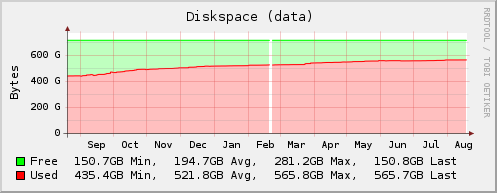
Example graph
Dependencies
- Most UNIXes
statfs(2)orstatvfs(2)getmntent(3)
- 4.4BSD or Mac OS X
statfs(2)orstatvfs(2)getfsstat(2)
Caveats
Reserved disk space
If the ReportReserved configuration option is set to false (the version 4 default), the disk space reserved for the root user is reported as "free". It may therefore happen that user processes can't write to a partition despite the graph showing remaining "free" disk space.
Setting ReportReserved to true is recommended and the (only) behavior of version 5.
Configuration
Configuration options · from collectd.conf(5)
See this section in the full configuration reference
- Device Device
-
Select partitions based on the devicename.
See
/"IGNORELISTS"for details. - MountPoint Directory
-
Select partitions based on the mountpoint.
See
/"IGNORELISTS"for details. - FSType FSType
-
Select partitions based on the filesystem type.
See
/"IGNORELISTS"for details. - IgnoreSelected true|false
- Invert the selection: If set to true, all partitions except the ones that match any one of the criteria are collected. By default only selected partitions are collected if a selection is made. If no selection is configured at all, all partitions are selected.
- LogOnce false|false
- Only log stat() errors once.
- ReportByDevice true|false
- Report using the device name rather than the mountpoint. i.e. with this false, (the default), it will report a disk as "root", but with it true, it will be "sda1" (or whichever).
- ReportInodes true|false
-
Enables or disables reporting of free, reserved and used inodes. Defaults to inode collection being disabled.
Enable this option if inodes are a scarce resource for you, usually because many small files are stored on the disk. This is a usual scenario for mail transfer agents and web caches.
- ValuesAbsolute true|false
- Enables or disables reporting of free and used disk space in 1K-blocks. Defaults to true.
- ValuesPercentage false|true
-
Enables or disables reporting of free and used disk space in percentage. Defaults to false.
This is useful for deploying collectd on the cloud, where machines with different disk size may exist. Then it is more practical to configure thresholds based on relative disk size.